Procreate Art Watercolour Paper Brushes: A Practical Evaluation
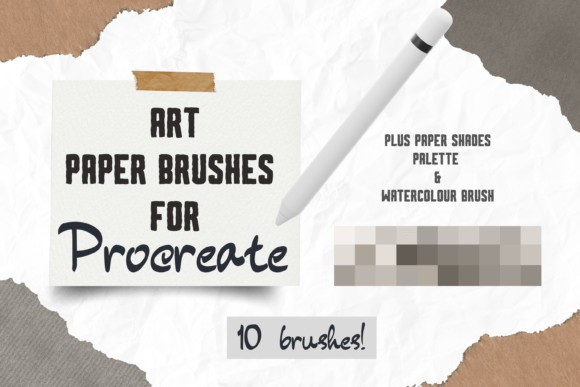
Digital illustration often struggles with the tactile authenticity of traditional media. While modern tablets and styluses offer incredible precision, they frequently lack the organic unpredictability of ink soaking into textured fiber. This is where specialized asset packs become essential tools for digital creators. The Procreate Art Watercolour Paper Brushes set addresses this specific gap by providing a collection of eight hand-drawn digital brushes designed to simulate the look and feel of genuine watercolour paper. For professionals and serious hobbyists working within the Procreate ecosystem, understanding how these brushes function can significantly elevate the perceived quality of digital artwork intended for both screen and print.
The Core Functionality of Digital Texture Brushes
The primary value proposition of the Procreate Art Watercolour Paper Brushes lies in their ability to replicate physical texture without requiring complex layer blending modes or external plugins. Unlike standard smoothing brushes that create uniform strokes, these assets are engineered to introduce variance in opacity and edge definition. The pack contains eight unique individual hand-drawn digital brushes, each calibrated to produce distinct paper grain effects. This variety allows artists to move beyond flat, sterile backgrounds and inject a sense of history and materiality into their compositions.
What makes this specific set worth discussing is its dual-purpose design. It includes not only the texture-generating brushes but also two realistic watercolour brushes. This combination suggests a workflow where the artist first establishes the "paper" base and then applies paint that interacts naturally with that simulated surface. In professional contexts, such as creating assets for print-on-demand services or high-end greeting cards, the difference between a flat digital vector and a textured raster image is often the deciding factor in consumer appeal.
Workflow Integration and Technique
To utilize the Procreate Art Watercolour Paper Brushes effectively, one must understand the specific technique required to achieve the desired result. The process is straightforward but relies on user discipline regarding layer management. The recommended approach involves selecting a base shade for the paper—creams and greys typically yield the most authentic results—and running the brush across the canvas without lifting the stylus. Lifting and repeating this motion builds up the necessary opacity contrast to mimic the uneven absorption of real paper.
A critical component of this workflow is the use of separate layers. By placing the generated paper texture on a layer distinct from the actual artwork, artists retain full control over the final composition. Setting both the art layer and the paper texture layer to the Multiply blend mode creates the optical illusion that the pigment has been applied directly onto the textured surface. If the effect appears too intense, the opacity slider on the layer tab offers immediate correction. This non-destructive editing capability is vital for professionals who need to iterate quickly without compromising the integrity of their original illustration.
Practical Applications Across Creative Industries
The versatility of these instant download hand-drawn created digital brushes extends far beyond personal sketching. They are particularly valuable for creative projects that require a handmade aesthetic. For entrepreneurs and small business owners involved in the print-on-demand sector, the ability to generate unique wrapping paper designs, wall art, or fabric patterns with a watercolour finish is a significant competitive advantage. The organic nature of the brush strokes ensures that no two pieces are identical, adding a premium feel to mass-produced goods.
In the realm of stationery and paper goods, the application is equally robust. Designers creating greetings cards, invitations, or scrapbooking elements often face the challenge of making digital files feel warm and inviting. The clip art elements and textures provided in this pack facilitate this transition. When used correctly, the resulting files maintain high resolution and clarity, ensuring they perform well when sent to commercial printers. This reliability is crucial for marketers and publishers who cannot afford the risk of pixelation or banding in their final printed products.
Evaluating Quality and Consistency
When assessing the long-term value of digital assets, consistency is paramount. The Procreate Art Watercolour Paper Brushes demonstrate a high level of reliability in their output. Because the brushes are hand-drawn, they avoid the repetitive, algorithmic loops that often plague lower-quality texture packs. Each stroke introduces subtle variations in density and flow, which contributes to a more natural appearance. However, users should note that the effectiveness of these brushes is heavily dependent on the skill of the operator. The instruction to "run your brush across the page without lifting it" requires a steady hand and an understanding of pressure sensitivity.
The inclusion of a dedicated colour palette further enhances the utility of the set. Selecting the right hues for the paper background is often a trial-and-error process for beginners. By providing a curated selection of creams and greys, the pack streamlines this decision-making process, allowing creators to focus on composition rather than color theory. This attention to detail indicates a product developed with the end-user's workflow in mind, reducing friction and increasing productivity.
Limitations and Technical Considerations
While the Procreate Art Watercolour Paper Brushes offer significant benefits, there are practical limitations to consider. Most notably, these files are digital brushes designed exclusively for the Procreate App. They will not function in other software environments such as Adobe Photoshop, Illustrator, or Clip Studio Paint. For freelancers or agencies that operate across multiple platforms, this exclusivity may limit the pack's overall utility unless the entire workflow is shifted to iPad-based production.
Furthermore, while the brushes simulate texture effectively, they do not replace the need for high-resolution source images. If the underlying artwork is low-resolution, applying a texture overlay will not improve the final output quality. Users must ensure their canvas settings are optimized for their intended output size, whether that be a social media graphic or a large-format poster. Additionally, the "Multiply" blend mode technique works best with lighter backgrounds; attempting to use this method on dark or highly saturated bases may yield muddy or indistinct results.
Who Benefits Most From This Tool?
This resource is ideally suited for adults aged 20–50 who are actively engaged in digital crafting. Professionals such as graphic designers, illustrators, and marketers looking to add a bespoke touch to their client deliverables will find the pack invaluable. Educators teaching digital art can also leverage these brushes to demonstrate how texture influences perception in visual media. Serious hobbyists pursuing scrapbooking or card making will appreciate the ease with which they can achieve a professional-grade look without purchasing expensive physical materials.
For those managing a print-on-demand store, the ability to rapidly prototype new designs using these brushes can accelerate time-to-market. The instant download format means there is no waiting period for shipping, allowing for immediate integration into ongoing projects. Whether the goal is to create a cohesive brand identity through custom wrapping paper or to design a series of limited-edition prints, the Procreate Art Watercolour Paper Brushes provide a flexible foundation.
Final Assessment of Value
In the crowded market of digital art assets, the Procreate Art Watercolour Paper Brushes stand out for their specific focus on simulating traditional media within a modern digital environment. They bridge the gap between the efficiency of digital tools and the aesthetic warmth of analog techniques. While they require a degree of technical understanding regarding layer blending and brush handling, the learning curve is minimal for anyone familiar with basic Procreate functions.
The combination of eight texture brushes and two realistic watercolour tools offers a comprehensive solution for artists seeking to enhance the tactile quality of their work. By following the recommended workflow—using separate layers, adjusting opacity, and utilizing the Multiply blend mode—users can consistently produce artwork that rivals traditional watercolour paintings. For professionals and enthusiasts alike, this pack represents a practical investment in expanding their creative toolkit, offering both immediate usability and long-term flexibility for a wide range of creative projects.