Affinity Brushes Grunge Texture Stamps: A Practical Evaluation
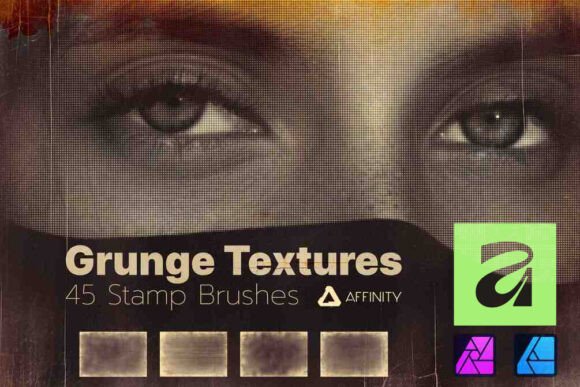
In the realm of digital design, texture is often the defining element that separates a flat illustration from a compelling visual narrative. For professionals working within the Affinity ecosystem, finding assets that balance high resolution with workflow efficiency is critical. The Affinity Brushes Grunge Texture Stamps pack represents a significant resource for designers seeking to inject raw, authentic character into their work without compromising on quality. This collection offers 45 meticulously crafted grunge brushes in 4K resolution, designed specifically for Affinity Designer, Affinity Photo, and their iPad counterparts across Mac and PC platforms.
Unlike generic texture overlays that can appear muddy or low-fidelity upon scaling, this pack focuses on precision. The inclusion of 4K resolution ensures that when these stamps are applied to large-format prints or high-definition digital displays, the intricate details of the grunge patterns remain crisp. This level of detail is essential for modern professional workflows where output quality is non-negotiable. Whether you are retouching portraits, creating album art, or designing marketing materials, the ability to apply complex textures with a single click can drastically reduce production time while elevating the final aesthetic.
Understanding the Core Utility of Grunge Stamps
The primary function of the Affinity Brushes Grunge Texture Stamps is to serve as a versatile texturing tool that integrates seamlessly into pixel-based editing. While vector-based tools in Affinity Designer offer clean lines and scalability, they often lack the organic imperfections found in physical media. These brushes bridge that gap by providing pre-rendered, high-quality stampable textures that mimic wear, tear, dust, scratches, and decay.
What makes this specific pack worth discussing is its adaptability. It is not merely a set of static images; it is a dynamic brush engine. Each of the 45 brushes acts as a stamp, allowing users to place a specific texture instance anywhere on a canvas. This differs significantly from continuous stroke brushes, which build up texture over time. The stamp mechanism provides immediate control over placement and density, making it ideal for targeted applications such as adding distress to a specific corner of a poster or overlaying subtle grain onto a portrait's background.
For freelancers and small business owners, the value proposition lies in speed and consistency. Creating custom grunge effects from scratch involves scanning physical surfaces, cleaning up noise, adjusting levels, and masking. With this pack, those steps are condensed into a single interaction. The result is a consistent library of textures that can be deployed repeatedly across different projects, ensuring a cohesive brand identity or artistic style without the overhead of asset creation.
Workflow Integration and Technical Performance
One of the most practical aspects of evaluating any creative asset is how well it fits into an existing pipeline. The Affinity Brushes Grunge Texture Stamps are engineered for straightforward integration. The process typically involves creating a new pixel layer above your base artwork and selecting the desired brush from the brush studio. A single click stamps the texture onto the layer. This simplicity belies the complexity of the underlying data, which includes high-resolution alpha channels and detailed edge information.
Performance is another critical factor, particularly for users working on tablets like the iPad. High-resolution brushes can sometimes cause lag or memory issues if not optimized correctly. However, given the 4K specification, these brushes maintain sharpness even when zoomed in, suggesting robust optimization for Affinity’s rendering engine. On desktop platforms (Mac and PC), the performance remains stable, allowing for rapid iteration. Designers can experiment with multiple layers of texture, adjusting opacity and flow without experiencing significant slowdowns, which is vital during tight deadlines.
The user interface experience is intuitive. There is no need for complex configuration or external plugins. The brushes load directly into the standard brush panel, treating them as native tools. This reduces friction in the creative process, allowing artists to focus on composition and color rather than troubleshooting technical compatibility. The seamless transition between Affinity Photo and Affinity Designer further enhances utility, meaning a texture developed for a photo edit can be instantly repurposed for a vector graphic project.
Mastering Blend Modes and Color Adaptation
The true power of the Affinity Brushes Grunge Texture Stamps emerges when combined with blend modes. Because the textures are essentially grayscale masks with varying degrees of transparency, they respond exceptionally well to blending options such as Multiply, Overlay, Soft Light, and Screen. This flexibility allows the same brush to create dark, gritty shadows or light, dusty highlights depending on the context.
Furthermore, the pack supports limitless color adaptation. Users are not restricted to black-and-white textures. By applying a hue/saturation adjustment layer clipped to the texture layer, or simply changing the foreground color before stamping, the grunge effect can take on any color palette required by the project. This is particularly useful for branding projects where a specific color scheme must be maintained. For example, a designer might use a rust-colored grunge stamp to evoke an industrial feel or a faded blue texture to suggest vintage photography.
This adaptability extends to the creative freedom it offers. Artists can stack multiple stamps, rotate them, and resize them to create unique, composite textures that do not look repetitive. The variety within the 45-brush collection ensures that there is rarely a need to reuse the exact same pattern twice, preventing the "tiled" look that often plagues lower-quality texture packs.
Real-World Applications and Use Cases
To understand the practical value of these brushes, it is helpful to examine specific scenarios where they excel. In portrait photography, subtle grunge overlays can add depth and atmosphere, transforming a clean studio shot into something more emotive and timeless. By using a low-opacity stamp on a separate layer, photographers can introduce film grain or dust specks that draw the viewer's eye without distracting from the subject.
For graphic designers working on posters, flyers, or album covers, these brushes provide an instant way to establish a mood. A music band looking for a raw, punk-rock aesthetic can utilize the heavier, more chaotic stamps to create distressed backgrounds. Conversely, a luxury brand might opt for finer, more delicate textures to add a sense of age and heritage to their packaging design. The versatility of the pack means it serves both ends of the spectrum effectively.
Digital illustrators also benefit significantly. When combining hand-drawn elements with digital rendering, textures help unify the disparate elements, giving the entire piece a cohesive, tactile feel. The Affinity Brushes Grunge Texture Stamps allow illustrators to simulate paper grain, ink bleed, or paint splatter, grounding their digital creations in a sense of physical reality.
Limitations and Considerations
While the pack is highly effective, it is important to approach it with realistic expectations. As with any preset asset, overuse can lead to a generic look. If every project relies heavily on the same set of grunge textures, the work may begin to feel formulaic. Professional results require a discerning eye; knowing when to apply a texture and, more importantly, when to leave an area clean, is just as crucial as the application itself.
Additionally, while the 4K resolution is excellent for most print and web applications, extremely large-scale billboards or specialized architectural prints might require even higher resolutions depending on the viewing distance. In such cases, users may need to scale the brushes carefully or combine them with other high-res assets to ensure absolute fidelity at massive scales. Furthermore, because these are pixel-based stamps, they do not possess the infinite scalability of pure vector shapes, though the high resolution mitigates this issue for most standard uses.
Who Benefits Most from This Resource?
The Affinity Brushes Grunge Texture Stamps are particularly well-suited for a diverse range of creatives. Photographers who specialize in editorial, fashion, or fine art will find them invaluable for post-processing. Graphic designers in advertising and branding agencies can use them to quickly prototype concepts that require a textured aesthetic. Freelancers offering services on platforms like Fiverr or Upwork can leverage these tools to deliver high-quality, textured designs faster, thereby increasing their throughput and profitability.
Even serious hobbyists and educators teaching digital art will find value here. The ease of use makes it an excellent tool for demonstrating how texture affects perception in design. Students can learn about blend modes and layer management through practical application rather than abstract theory. For entrepreneurs managing their own social media content, these brushes offer a way to create unique, branded visuals that stand out in crowded feeds without needing advanced design skills.
Final Thoughts on Long-Term Value
In an industry where trends shift rapidly, having a reliable set of foundational assets is key to longevity. The Affinity Brushes Grunge Texture Stamps offer a timeless utility. While specific styles of grunge may wax and wane in popularity, the fundamental need for texture and depth in design remains constant. The investment in a high-quality, 4K resolution pack ensures that these assets will not become obsolete due to poor technical specifications.
Ultimately, this pack serves as a force multiplier for creativity. It removes the technical barriers to achieving complex textural effects, allowing designers to focus on the strategic and artistic aspects of their work. By integrating these brushes into your workflow, you gain the ability to transform ordinary compositions into visually stunning masterpieces with minimal effort. For anyone serious about maximizing their potential within Affinity Designer or Affinity Photo, this collection represents a practical, high-value addition to their digital toolkit.