Hairstyle Stamp Brushes Procreate: A Practical Evaluation for Digital Artists
For digital illustrators and portrait artists working within the iPad ecosystem, the efficiency of the workflow often dictates the quality of the final output. One specific tool that has gained traction among professionals is the Hairstyle Stamp Brushes Procreate. These resources are designed to streamline the complex process of rendering hair, a subject that can consume significant time when drawn stroke by stroke. By offering pre-designed hair textures and shapes, these brushes allow creators to focus more on composition, lighting, and character expression rather than getting bogged down in repetitive detailing.
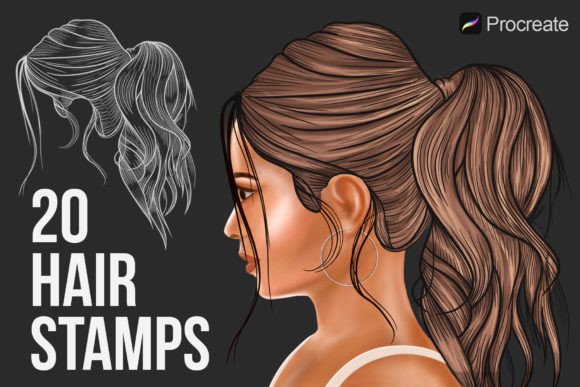
The core value proposition of this tool lies in its ability to transform a tedious manual process into a rapid assembly task. The package typically includes a single brushset containing 20 distinct hairstyle stamps. This variety provides a foundational library that covers different lengths, volumes, and styles, from short crops to flowing locks. However, like any specialized asset, it is essential to understand exactly what these tools offer, how they compare to traditional drawing methods or other digital alternatives, and whether they fit your specific artistic needs.
Understanding the Mechanics of Hair Stamps
At their most basic level, Hairstyle Stamp Brushes Procreate function as texture overlays. Unlike standard calligraphy or airbrush tools that rely on pressure sensitivity to create lines, stamp brushes apply a fixed image with every tap of the stylus. This mechanism is particularly useful for creating consistent hair strands, bangs, or volumetric clumps that maintain a uniform style across the artwork.
What makes this specific set distinct is its adaptability. While the base shape is fixed, the user retains full control over the visual properties of the stamp. You can easily change the color, opacity, and size of these stamp brushes to match the lighting conditions of your scene. For instance, lowering the opacity allows for softer, shadowed areas, while increasing the size can create broader strokes for background characters. This flexibility ensures that the stamps do not look "sticker-like" if used correctly, blending seamlessly into hand-drawn portraits.
The installation process is designed for simplicity, adhering to the standard protocols of the Procreate app. Users simply need to download the file and double-tap it to trigger an automatic installation. There is no need for complex software updates or external drivers; the only requirement is an iPad and the Procreate application. This low barrier to entry makes it accessible for both beginners who are still mastering layer management and veterans looking to speed up their turnaround time.
Comparing Stamps to Traditional Hand-Drawn Techniques
When evaluating whether to adopt Hairstyle Stamp Brushes Procreate, it is necessary to compare them against the traditional method of drawing hair manually. Drawing hair from scratch offers unparalleled customization. An artist can dictate the exact flow of every strand, ensuring perfect continuity and unique character-specific quirks. This approach is ideal for hyper-realistic portraits where the subtlety of individual hairs matters immensely.
However, the tradeoff is time. Rendering realistic hair manually can take hours for a single portrait. In contrast, using stamp brushes reduces this time significantly. The decision factor here is often the project deadline and the required level of detail. If you are creating concept art, storyboards, or illustrations where the overall silhouette and mood are more important than microscopic strand details, the stamp brushes provide a superior return on investment regarding time spent.
Furthermore, consistency is a challenge in manual drawing. Maintaining the same hair texture across multiple panels of a comic or a series of character sheets can be difficult. Stamp brushes solve this by providing a reusable asset. Once you find a stamp that matches your character's hair type, you can replicate it perfectly throughout the entire piece, ensuring a cohesive visual language.
Evaluating Flexibility and Limitations
While the efficiency of stamps is clear, there are limitations to consider. Because the shapes are pre-defined, they may not always align perfectly with the unique curvature of a specific head shape without some manipulation. Artists may find themselves needing to rotate, scale, or layer multiple stamps to achieve a natural look. This requires a certain level of spatial awareness and editing skill.
In comparison, alternative approaches might include using vector-based hair assets or 3D reference models imported into the canvas. Vector assets offer infinite scalability but often lack the organic texture of raster-based stamps. 3D references provide accurate lighting and form but require a completely different software stack and learning curve. The Hairstyle Stamp Brushes Procreate sit in a middle ground, offering the organic feel of a raster image with the speed of a reusable asset, all within the familiar environment of the drawing app.
Best Use Cases for Hairstyle Stamp Brushes
Determining when these brushes are the right choice involves analyzing the nature of your project. They are exceptionally well-suited for:
- Character Design Sheets: When you need to visualize multiple variations of a character quickly, stamps allow you to swap hairstyles in seconds to see which fits the personality best.
- Comic Book Art: Consistency across pages is crucial. Using a set of 20 hairstyle stamps ensures that a character looks the same in panel one as they do in panel twenty.
- Social Media Content: For artists producing daily sketches or content for platforms like Instagram, speed is vital. These brushes enable the creation of high-quality digital portraits, artworks, and sketches easily and rapidly.
- Background Characters: Crowds or secondary characters often require less detail. Stamps allow you to populate a scene with diverse hair types without spending hours on minor figures.
Conversely, there are situations where another option might be preferable. If you are creating a photorealistic commercial advertisement where every pore and hair strand must be scrutinized under high magnification, relying solely on stamps might result in a slightly artificial appearance. In such cases, a hybrid approach—using stamps for the base volume and painting fine details manually on top—is often the professional standard.
Decision Factors for Purchasing and Usage
Before integrating these tools into your workflow, consider the terms of use and the long-term value. The product typically comes with a license that prohibits re-selling, re-distributing, or sharing the files. This is standard practice for digital assets to protect the creator's intellectual property. It is important to respect these terms, as unauthorized distribution can lead to legal issues and devalue the market for digital art resources.
Another factor is the learning curve. While the installation is automatic, mastering the art of blending stamps so they don't look repetitive takes practice. Artists should experiment with varying the opacity and color temperature to break up the pattern. For example, using a cooler tone for shadows and a warmer tone for highlights on the same stamp can add depth that a flat color cannot achieve.
Additionally, consider the versatility of the included set. With 20 hairstyle stamps, the collection offers a solid starting point. However, depending on your niche, you might eventually need more specific styles. Some artists prefer building a custom library over time, while others find a curated set sufficient for their general portfolio. Evaluating your current project backlog against the provided styles will help determine if this specific set meets your immediate needs.
Integrating Stamps into a Professional Workflow
To get the most out of Hairstyle Stamp Brushes Procreate, integration into a broader workflow is key. Start by sketching the head shape and facial features. Then, select a stamp that roughly matches the desired hair volume. Place it on a separate layer above the skin tone. This separation allows you to adjust the position without affecting the underlying drawing.
Once positioned, use the transformation tools to warp or rotate the stamp to follow the anatomy of the head. Do not rely on the default orientation. Afterward, use a soft eraser or a masking technique to blend the edges of the stamp into the neck or forehead. Finally, add manual highlights and shadows using a standard brush to tie the stamped element into the lighting scheme of the rest of the image. This hybrid method leverages the speed of the stamps while maintaining the artistic integrity of a hand-finished piece.
Ultimately, the decision to use these brushes depends on balancing efficiency with artistic intent. For adults aged 20–50 who are managing client deadlines, freelance projects, or personal portfolios, the ability to produce high-quality work faster is a significant advantage. The Hairstyle Stamp Brushes Procreate offer a practical solution for those moments when time is scarce but quality cannot be compromised. By understanding their strengths, limitations, and proper application, artists can make an informed decision that enhances their productivity without sacrificing their unique style.