Transforming Digital Art with Procreate City Skyline Creator Brushes
The digital art landscape has evolved significantly, moving beyond simple pixel manipulation to sophisticated environments where artists can construct entire worlds with a single tap. Among the most transformative tools for iPad creators are specialized brush sets designed to replicate complex architectural structures instantly. The Procreate City Skyline Creator Brushes represent a pivotal resource for artists looking to expand their horizons in urban illustration, background design, and concept art. These tools bridge the gap between manual drawing skills and rapid prototyping, allowing users to generate intricate cityscapes that would otherwise require hours of meticulous line work.
The Evolution of Urban Illustration Tools
Historically, creating a detailed cityscape required a deep understanding of perspective, structural engineering, and architectural styles. Artists spent countless hours sketching individual windows, rooflines, and structural supports. While this traditional approach builds fundamental skills, it is often impractical for modern workflows that demand speed and iteration. The introduction of high-quality stamp brushes has revolutionized this process. By utilizing pre-rendered shapes and silhouettes, creators can now focus on composition, lighting, and color theory rather than getting bogged down in repetitive detailing.
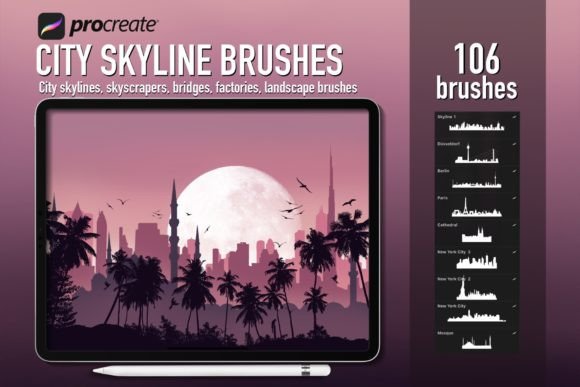
The specific collection known as the Procreate City Skyline Creator Brushes offers a comprehensive library of 106 unique stamps. This volume provides a diverse range of elements, from towering skyscrapers to industrial factories and delicate bridges. The variety ensures that an artist is never limited by a lack of assets when constructing a scene. Whether the goal is a futuristic metropolis or a gritty industrial zone, these brushes provide the foundational vocabulary needed to build the narrative environment.
Understanding the Brush Architecture
At the core of these tools is the .brushset format, a proprietary file type designed exclusively for the Procreate application on iPad. Unlike standard Photoshop brushes, which rely on different engine parameters, Procreate brushes utilize dynamic shape generation and alpha channels optimized for touch interaction. The skyscraper brushes within this set are not merely static images; they are vector-like stamps that maintain crisp edges at any zoom level. This technical distinction is crucial for professionals who need to export their work for large-format printing or high-resolution digital displays.
The inclusion of landscape silhouettes adds another layer of depth. These elements are designed to be layered, allowing artists to create atmospheric perspective easily. By placing darker, sharper silhouettes in the foreground and lighter, softer ones in the background, a sense of vast distance is achieved instantly. This technique is essential for creating immersive scenes that draw the viewer into the artwork.
Practical Applications Across Industries
The utility of the Procreate brushes - City skyline creator extends far beyond personal hobbyist projects. Professionals across various sectors have integrated these tools into their daily workflows to enhance productivity and visual output. Understanding the real-world applications helps clarify why such a specific asset pack holds value for a broad audience.
Concept Art and Game Design
In the realm of game development and film production, concept artists are tasked with generating hundreds of environment variations quickly. Time is a critical factor during pre-production. Using building stamps allows concept artists to rapidly block out city layouts, testing different densities and architectural styles without committing to final details. A designer can place a cluster of factory brushes to establish an industrial district, then swap them out for residential blocks in seconds. This agility fosters creativity, enabling teams to explore more ideas before settling on a final direction.
Illustration and Book Cover Design
For illustrators working on children's books, graphic novels, or album covers, the ability to create compelling backgrounds is paramount. A story set in a bustling city requires a backdrop that feels alive without distracting from the main characters. The cityscape silhouette brushes provide the perfect solution. They offer enough detail to suggest complexity but remain stylized enough to blend seamlessly with hand-drawn characters. Artists can manipulate opacity and blending modes to integrate these digital stamps with traditional painting techniques, resulting in a hybrid aesthetic that is both modern and organic.
Marketing and Social Media Content
Business owners and content creators also benefit from these resources. In an era where visual content drives engagement, having access to professional-grade imagery is essential. A marketing team needing a background for a product launch video or a social media post can use these brushes to create custom cityscapes that align with their brand identity. Instead of purchasing expensive stock photos that may not fit perfectly, designers can construct a unique scene using the bridge and skyscraper elements, ensuring total creative control over the final image.
Mastering the Workflow: Installation and Setup
To leverage the full potential of the Procreate City Skyline Creator Brushes, proper installation is the first step. The process is streamlined for users of the latest iOS updates, ensuring a seamless transition from download to creation. It is important to note that these files are strictly compatible with the Procreate app on iPad; they will not function in desktop software like Adobe Photoshop or other mobile applications.
- Download the File: Begin by accessing the source platform, such as Creative Fabrica, and locate the desired brush set. Ensure you are downloading the correct file extension, specifically the .brushset format.
- Initiate Import: Once the download begins, look for the download arrow icon typically located on the top right side of your browser bar. Click this to reveal the list of downloaded files.
- Select the Brush Set: From the dropdown menu, choose the .brushset file corresponding to the city skyline collection. Upon selection, the file should automatically import directly into the Procreate application.
- Verify Installation: Open Procreate on your iPad and navigate to the brush library. You will find a new folder containing the 106 stamp brushes, ready for immediate use.
This automated import feature eliminates the need for complex file management, making the tool accessible even to those less familiar with digital file systems. However, users must ensure their devices meet the system requirements, specifically running a version of iPadOS that supports the latest Procreate features.
Techniques for Dynamic Composition
Having the tools is only half the battle; knowing how to wield them effectively determines the quality of the final artwork. The Procreate brushes - City skyline creator are designed to be flexible, encouraging experimentation rather than rigid adherence to templates.
Varying Scale and Rotation
One of the most common mistakes when using stamp brushes is creating a repetitive, robotic look. To avoid this, artists should vary the scale and rotation of each stamp. A city is rarely uniform; buildings lean slightly, towers differ in height, and bridges curve naturally. By rotating a skyscraper brush by a few degrees and adjusting its size, the structure appears more organic. Layering multiple stamps with slight overlaps creates a sense of density and realism that mimics the chaotic beauty of actual urban environments.
Layering for Depth
Depth is achieved through layering and atmospheric perspective. Start with the background elements using lighter colors and lower opacity. Use the landscape silhouettes to define the horizon line. Move to the mid-ground with medium-sized building stamps, adding more definition. Finally, place the largest and darkest elements in the foreground. This technique guides the viewer's eye through the composition, creating a three-dimensional feel on a two-dimensional screen.
Color and Lighting Integration
While the brushes come in grayscale or black silhouettes, their true power lies in how they interact with color. Artists can apply gradients, texture overlays, and lighting effects to transform flat stamps into vibrant scenes. For example, applying a warm sunset gradient behind a cityscape silhouette can evoke a sense of nostalgia or warmth. Conversely, cool blues and purples with neon accents can create a cyberpunk atmosphere. The versatility of the Procreate City Skyline Creator Brushes allows for endless stylistic interpretations.
Considerations for Professional Use
While these brushes offer immense efficiency, there are considerations for professionals aiming for commercial success. Licensing terms are a critical aspect to review. Most brush sets purchased from platforms like Creative Fabrica come with licenses that allow for personal and commercial use, but it is always prudent to verify the specific terms regarding derivative works. Additionally, relying too heavily on stamps can sometimes lead to a "stock" appearance if not customized sufficiently.
To maintain a unique artistic voice, it is recommended to combine these digital stamps with hand-painted elements. Adding custom details, such as unique window patterns, streetlights, or vegetation, breaks up the uniformity of the stamps. This hybrid approach ensures that the final piece retains the speed of digital tools while showcasing the artist's individual style and craftsmanship.
Future Trends in Digital Asset Creation
The trend toward specialized, high-volume brush sets is likely to continue as digital art becomes more integral to various industries. As hardware capabilities improve, we can expect even more dynamic brushes that incorporate animation, 3D rendering, and AI-assisted generation. However, the fundamental need for curated, high-quality assets like the Procreate City Skyline Creator Brushes remains constant. These tools serve as the building blocks for the next generation of digital storytellers, educators, and creators.
Whether you are a student learning the basics of composition, a professional illustrator meeting tight deadlines, or a business owner crafting brand visuals, the integration of these specialized brushes can significantly elevate your workflow. By mastering the installation, understanding the architecture of the brushes, and applying creative techniques for composition, you unlock a world of possibilities in urban digital art. The result is not just a faster workflow, but a richer, more diverse portfolio of work that stands out in an increasingly competitive visual landscape.