Next Pattern V1 ✦ Procreate Brushes Set: A Deep Dive into Digital Texture
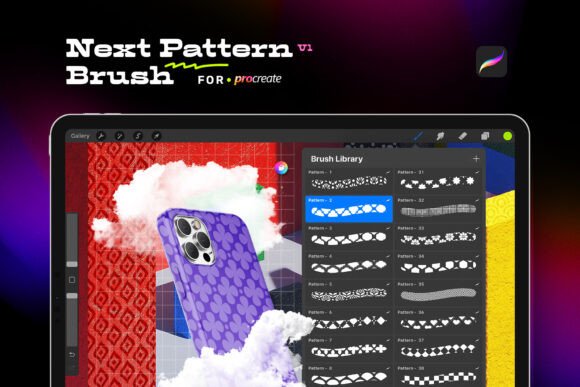
For digital artists and designers working on the iPad, the difference between a flat illustration and a piece with genuine depth often comes down to texture. That is where the Next Pattern V1 ✦ Procreate Brushes Set becomes an indispensable asset. This toolkit isn't just a collection of random strokes; it is a curated library of over 70 high-quality seamless pattern brushes designed specifically to elevate your workflow within the Procreate app. Whether you are a professional illustrator tightening up a client deliverable or a hobbyist looking to add flair to a personal journal, this set offers a bridge between simple line work and complex, tactile surfaces.
Why Seamless Patterns Matter in Digital Art
The core strength of the Next Pattern V1 set lies in its ability to handle repetition without the tell-tale "seams" that plague lower-quality assets. In digital art, applying a background or a fabric texture can be tedious if the brush leaves visible grid lines or repeating artifacts. These brushes are meticulously crafted to maintain crisp, seamless repetition at any scale. This means you can drag your Apple Pencil across a massive canvas to create a wallpaper or fill a tiny detail on a character's clothing, and the result remains consistent and professional.
This technical precision allows for a more intuitive creative process. Instead of spending hours manually painting textures or struggling to tile images in Photoshop, you can apply complex geometric designs or organic textures with a single stroke. The user-friendly optimization ensures that the application is quick, letting you focus on composition and color rather than fighting with your tools.
Real-World Applications for Designers and Artists
The versatility of the Next Pattern Procreate Brushes Set shines when applied to specific, real-world scenarios. Its utility extends far beyond simple doodling, making it a robust solution for various industries and creative needs.
Fashion and Fabric Mockups
For fashion illustrators and textile designers, creating realistic fabric swatches is a daily requirement. The diverse collection of patterns in this set, ranging from intricate geometric weaves to organic floral motifs, provides an immediate starting point for fabric design. Imagine sketching a new dress collection; instead of leaving the garment as a flat silhouette, you can instantly apply a textured brocade or a subtle linen weave using these brushes. This capability is particularly valuable for presenting concepts to clients who need to visualize how a pattern will look on a finished product before production begins.
Digital Scrapbooking and Journaling
In the realm of digital scrapbooking and bullet journaling, aesthetics are paramount. Users often struggle to find backgrounds that don't overpower their photos or text. The Next Pattern V1 set offers a range of subtle textures that add depth without distraction. You can use the lighter, more delicate patterns to create vintage-style paper backgrounds or use bolder geometric designs to frame important memories. Because the brushes are optimized for Procreate, they respond well to pressure sensitivity, allowing for dynamic opacity changes that mimic traditional media like watercolor washes or ink stamps.
Backgrounds and UI Elements
Graphic designers and UI/UX professionals frequently need unique, non-repetitive backgrounds for websites, app interfaces, or social media graphics. While stock photo sites offer options, they often lack the customizability required for brand alignment. With this brush set, you can generate bespoke backgrounds on the fly. The ability to adjust the size and spacing of the pattern directly within Procreate means you can tailor the density of the texture to fit the specific dimensions of a mobile screen or a desktop banner perfectly.
Who Benefits Most From This Toolkit?
While the tool is marketed broadly, different users will extract value from the Next Pattern V1 ✦ Procreate Brushes Set in distinct ways based on their skill level and goals.
Professional Illustrators: For those charging for their time, speed is currency. This set acts as a force multiplier, reducing the time spent on texturing by up to 50% in some workflows. It allows professionals to iterate faster, offering clients multiple texture variations for a single project without the overhead of manual rendering.
Hobbyists and Students: Beginners often feel intimidated by the blank canvas or the complexity of creating textures from scratch. This set lowers the barrier to entry, providing professional-grade results immediately. It serves as an educational tool, helping learners understand how patterns interact with light and form simply by experimenting with the brushes in different layers and blending modes.
Crafters and DIY Enthusiasts: Those who print their digital art for physical crafts—such as stickers, greeting cards, or t-shirt transfers—benefit from the high-quality details. The crispness of the patterns ensures that when printed, the design retains its integrity, avoiding the pixelation or blurring that can ruin a physical product.
Practical Considerations Before You Start
Before integrating the Next Pattern V1 set into your workflow, there are a few practical considerations to keep in mind to ensure the best experience. First and foremost, compatibility is key. These brushes are exclusively designed to work within the Procreate app. They are not compatible with other software like Adobe Fresco, Affinity Designer, or desktop-based applications. If your primary workspace is outside of the iPad ecosystem, this tool will not serve your needs.
You will also need specific hardware to unlock the full potential of the brushes. An iPad running Procreate version 5 or above is the minimum requirement. However, for optimal performance and precision, pairing the tablet with an Apple Pencil is highly recommended. The pressure sensitivity of the pencil allows you to control the flow and opacity of the patterns, which is essential for achieving natural-looking gradients and transitions. Without the pencil, the application of these brushes may feel rigid and less organic.
Strengths and Limitations
The primary strength of the Next Pattern V1 set is its sheer volume and variety. With over 70 seamless patterns, the likelihood of finding a style that fits your specific aesthetic is incredibly high. The quality of the individual brushes is another standout feature; they are built to hold up under scrutiny, maintaining clarity even when zoomed in or scaled up significantly.
However, the limitation is inherent in its specialization. Because these are Procreate-exclusive assets, they cannot be used in a cross-platform workflow. Additionally, while the brushes provide excellent base textures, they are not a replacement for artistic judgment. Using them effectively requires an understanding of layer management, opacity settings, and blending modes within Procreate to avoid a "stamped-on" look. The tool provides the ingredients, but the artist must still cook the meal.
Unlocking New Realms of Digital Artistry
Ultimately, the Next Pattern V1 ✦ Procreate Brushes Set is about expanding your creative vocabulary. It transforms the iPad from a drawing tablet into a comprehensive design studio capable of producing professional-grade textures and patterns. Whether you are designing the next big fashion trend, documenting your life in a digital journal, or building a brand identity, having access to such a versatile toolkit can transform your art today. By leveraging these 70+ seamless patterns, you gain the freedom to experiment, iterate, and create with a level of ease and quality that was previously difficult to achieve on a mobile device.