Flower Brushes - Procreate: A Complete Guide to Digital Botanical Art
Digital illustration often struggles with the organic chaos of nature. While geometric shapes and clean lines are easy to replicate on a tablet, capturing the delicate, imperfect beauty of a blooming garden requires specific tools. This is where Flower Brushes - Procreate becomes an essential asset for digital artists. Instead of laboriously painting every petal from scratch or searching endlessly through stock libraries, this specialized set offers a streamlined solution for adding botanical elements to your work instantly.
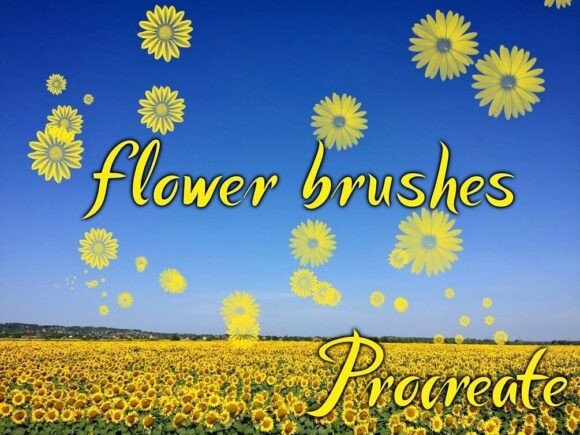
The core of this resource is its versatility and efficiency. The collection provides 30 high-quality brushes derived from 15 distinct flower designs. Each of these 15 floral motifs is engineered to function in two unique ways: as a precise stamp brush and as a dynamic confetti brush. This dual functionality means you aren't just getting a static image; you are gaining control over how those flowers interact with your canvas, whether you need a single, perfect bloom placed exactly where you want it, or a scattered field of petals drifting across a background.
The Dual Nature of Stamp and Confetti Brushes
Understanding the difference between the two modes included in the Flower Brushes - Procreate set is key to unlocking its full potential. The stamp mode acts like a traditional rubber stamp or a custom photo cutout. When you tap the screen, the entire flower renders at once, maintaining its integrity and detail. This is ideal for focal points. If you are illustrating a portrait and want to place a specific rose behind the subject's ear, the stamp ensures that the flower looks intentional and crisp.
In contrast, the confetti mode transforms the same flower into a scattering tool. With a single swipe or flick of the Apple Pencil, the brush distributes multiple instances of the flower along your stroke path. The size, rotation, and spacing can vary, creating a natural, wind-blown effect. This is particularly useful for creating depth in a scene without having to manually draw dozens of individual blooms. It mimics the way flowers grow in clusters or how petals might fall during a storm, adding texture and movement that would otherwise take hours to achieve by hand.
Real-World Applications for Designers and Artists
The utility of these brushes extends far beyond simple hobbyist doodling. Professionals across various creative industries find practical value in integrating these assets into their workflows.
Wedding Stationery and Event Planning
For graphic designers specializing in weddings, time is often the most scarce resource. Clients frequently request custom invitations, save-the-dates, and menu cards featuring specific floral themes. Using Flower Brushes - Procreate, a designer can rapidly prototype different arrangements. You can quickly test how a lavender sprig looks against a navy background versus a cream one. The ability to switch between stamping a large centerpiece flower and scattering smaller buds allows for rapid iteration on layout designs before committing to the final vector conversion or print file.
Social Media Content Creation
Content creators managing lifestyle, fashion, or wellness brands often need fresh imagery daily. Stock photos can feel generic, while custom photography is expensive. These brushes offer a middle ground. An Instagram creator can overlay a scattering of cherry blossoms onto a flat-lay photo of skincare products to create a cohesive spring campaign. The confetti mode is perfect for framing text overlays or adding subtle decorative borders to stories and reels, giving the content a polished, editorial look without needing complex photo manipulation skills.
Textile and Surface Pattern Design
Pattern designers require seamless repeats and varied scales of motifs. The 15 different flowers included in the set provide a diverse library of shapes, from daisies to peonies. By utilizing the confetti setting, designers can create organic, non-repeating backgrounds that serve as excellent bases for fabric prints, wrapping paper, or wallpaper. The variation in the scatter prevents the "grid" look that often plagues digital patterns, resulting in a more natural, hand-painted aesthetic that appeals to modern consumers.
Book Illustration and Storytelling
Children's book illustrators often need to populate scenes with lush environments. Drawing a meadow filled with wildflowers individually is tedious. With this brush set, an illustrator can sweep across the bottom of a page to create a grassy field dotted with colorful blooms. The stamp feature allows for highlighting specific flowers that characters might interact with, such as picking a dandelion, ensuring those key narrative elements remain sharp and focused amidst the softer background details.
Who Benefits Most from This Tool?
While the tool is accessible to anyone with an iPad, certain user groups will find it particularly transformative.
- Beginner Artists: Those who struggle with drawing realistic flora can still produce professional-looking results. The brushes handle the anatomy of the flower, allowing the artist to focus on composition, color theory, and lighting.
- Hobbyists and Journalers: People who use Procreate for bullet journaling or digital scrapbooking can add instant seasonal flair to their pages. A few taps can turn a plain planner page into a spring-themed spread.
- Freelance Illustrators: For professionals juggling tight deadlines, these brushes act as a productivity booster. They reduce the time spent on repetitive tasks, freeing up energy for conceptualization and client communication.
- Therapeutic Art Practitioners: The meditative quality of scattering flowers or placing them gently on a canvas can be part of a mindfulness practice. The ease of use reduces frustration, keeping the focus on the joy of creation rather than technical difficulty.
Practical Considerations Before Downloading
Before integrating Flower Brushes - Procreate into your workflow, there are a few technical and artistic considerations to keep in mind. First and foremost, compatibility is strict. These brushes are designed exclusively for the Procreate app on iPad. They will not function on desktop versions of Adobe Photoshop, Clip Studio Paint, or mobile apps on Android devices. The file format is a proprietary `.brushset` file, which is optimized specifically for Procreate's engine.
Installation is straightforward but requires familiarity with the app's import process. Upon download, you receive a single file containing all 30 brushes. To use them, you simply tap the file, and Procreate opens automatically to load the set into your brush library. There is no need for complex unzipping or third-party software, making it a plug-and-play experience for seasoned users.
However, artists should be mindful of resolution. While the brushes are high quality, they are raster-based. If you plan to scale a stamped flower up to massive sizes for large-format printing, you may encounter pixelation. It is best practice to use these brushes at the intended canvas resolution or slightly larger to ensure crisp edges. Additionally, because the confetti mode relies on random distribution, you lose some control over the exact placement of individual petals compared to drawing them manually. This is a trade-off between speed and absolute precision.
Maximizing Your Creative Output
To get the most out of the 15 flower varieties, consider experimenting with layer blending modes and opacity. A stamp applied at 100% opacity creates a bold, graphic statement. Lowering the opacity and switching the layer to "Multiply" or "Overlay" can make the flowers appear as if they are watercolor washes or faint shadows, adding atmospheric depth to your piece. Mixing the confetti brushes with other texture brushes can further enhance the realism, making the flowers look like they are growing out of rough paper or floating in water.
The true strength of Flower Brushes - Procreate lies in its ability to bridge the gap between digital convenience and organic beauty. It empowers artists to bring the vibrancy of the natural world into their digital canvases with unprecedented speed. Whether you are designing a wedding invitation, illustrating a storybook, or simply enjoying a quiet afternoon of digital gardening, this collection of 30 brushes offers a versatile toolkit that adapts to your unique creative needs. By downloading the `.brushset` file and loading it directly into your app, you unlock a world of floral possibilities limited only by your imagination.