Acrylic Stroke Brushes: Elevating Digital Artwork Through Texture and Precision
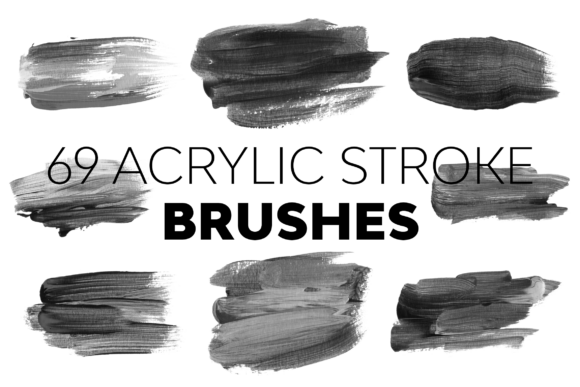
In the realm of digital illustration, the gap between a flat vector graphic and a piece that feels tangible often comes down to texture. Acrylic Stroke Brushes serve as a critical bridge in this process, allowing artists to simulate the physical properties of traditional paint within a digital environment. For professionals, freelancers, and hobbyists alike, integrating these tools into a workflow is not merely about adding visual flair; it is about enhancing the efficiency and emotional resonance of the creative output. The 69 Acrylic Stroke Brush Set represents a significant step forward in this methodology, offering a curated collection designed to transform ordinary designs into extraordinary masterpieces.
The Role of Texture in the Creative Workflow
Understanding where Acrylic Stroke Brushes fit into a broader design process is essential for maximizing their potential. In a typical project lifecycle, texture application often occurs during the refinement stage, after the initial sketch or layout has been established. However, relying solely on standard smooth brushes can result in artwork that lacks depth and character. By introducing acrylic-style strokes early in the rendering phase, creators can establish a cohesive textural language that guides the viewer's eye and adds weight to the composition.
This set is particularly valuable when transitioning from concept to execution. Whether you are an entrepreneur creating marketing materials, an educator designing course visuals, or a professional illustrator working on a client commission, the ability to quickly apply realistic paint effects saves hours of manual masking and blending. The high-resolution nature of these assets ensures that the final output remains crisp, regardless of the scale at which the work is viewed or printed.
Technical Specifications and Resolution Standards
One of the defining features of the 69 Acrylic Stroke Brush Set is its commitment to resolution integrity. In digital asset management, file size and pixel density are often trade-offs, but this collection manages to balance both effectively. With brush sizes ranging from 1693 to 4728 px, these tools are engineered to handle complex details without pixelation or blurring. This range is crucial for workflows that require versatility; a single brush set should be capable of handling fine line work as well as broad, sweeping background washes.
For professionals who prioritize quality control, this high-definition capability means less time spent upscaling images or retouching artifacts. When a brush maintains its definition at such large scales, it allows for greater freedom in experimentation. Artists can zoom in to refine edges or zoom out to assess the overall composition, confident that the stroke integrity will hold up under scrutiny. This reliability is a cornerstone of efficient production pipelines, reducing the need for post-processing corrections.
Integration Across Photoshop Versions
A common friction point in digital tool adoption is software compatibility. Designers often find themselves restricted by version-specific limitations, forcing them to maintain multiple versions of software or seek workarounds. The 69 Acrylic Stroke Brush Set addresses this by being tailored for adaptability across a wide spectrum of Adobe Photoshop versions. It supports environments ranging from CS6 through to the latest iterations including CC 2015.5, CC 2017, CC 2018, CC 2019, CC 2020, CC 2021, and CC 2022.
This extensive compatibility is vital for teams and individuals with varying hardware capabilities or legacy workflows. A marketing agency might have some designers on older systems while others utilize the newest cloud-based updates. Having a resource that functions seamlessly across this entire ecosystem ensures consistency in brand assets and project deliverables. It eliminates the "it works on my machine" scenario, allowing for smoother collaboration and file sharing among team members.
Furthermore, this longevity protects your investment. As software updates roll out, there is often anxiety about whether existing assets will remain functional. Knowing that these brushes are engineered to work across a decade of software evolution provides peace of mind, allowing creators to focus on the art rather than troubleshooting technical glitches.
Workflow Efficiency and Asset Organization
Efficiency in creative work is often determined by how easily one can access and utilize the right tool at the right moment. The set includes 69 distinct versions of acrylic stroke brushes, offering an extensive range of choices for different artistic needs. While variety is beneficial, it must be managed to avoid decision paralysis. The key to integrating these brushes effectively lies in understanding the specific use cases for each variation.
To implement this into your routine, consider organizing your workflow by project type. For instance, you might dedicate a subset of these brushes specifically for background textures, while reserving finer strokes for detailing and highlighting. The bundled Readme file serves as an essential guide in this organization process. It provides an easy-to-understand overview of the included assets, helping users navigate the library and select the appropriate brush for their immediate task. This documentation reduces the learning curve, ensuring that even those new to digital painting can leverage the full potential of the set quickly.
Moreover, the ability to experiment with multiple designs without committing to a single style encourages a more dynamic creative process. You can test different stroke patterns to see how they interact with lighting and color theory before finalizing a piece. This iterative approach leads to higher-quality outcomes and fosters a deeper understanding of how digital textures influence the perception of a design.
Support and Long-Term Usability
Beyond the technical specifications, the value of a digital product is significantly enhanced by the support structure surrounding it. In the fast-paced world of design, encountering a hurdle can stall progress. The creators of the 69 Acrylic Stroke Brush Set recognize this reality and prioritize customer service by offering 24/7 support. This commitment underscores a dedication to the user's design journey, ensuring that any queries regarding UnicDesign products are addressed promptly.
For small business owners and freelancers, time is a finite resource. Downtime caused by unresolved technical issues can impact deadlines and client relationships. Having direct access to support means that if a brush behaves unexpectedly or requires specific configuration within your version of Photoshop, assistance is available around the clock. This level of service transforms a simple purchase into a partnership, providing reassurance that you are not navigating the complexities of digital tools alone.
Long-term usability also depends on how well the tools adapt to evolving trends. Acrylic styles remain a staple in graphic design due to their organic feel, which contrasts beautifully with the clean lines of modern UI/UX design. By incorporating these brushes into your toolkit, you future-proof your ability to create versatile content that appeals to a broad audience. Whether you are producing social media graphics, educational illustrations, or commercial advertisements, the flexibility of these strokes ensures your work remains relevant and visually engaging.
Practical Implementation Strategies
To get the most out of the Acrylic Stroke Brushes, consider adopting a layered approach in your projects. Start by applying base colors with standard soft brushes, then overlay the acrylic strokes on separate layers using blending modes like "Multiply" or "Overlay." This technique preserves the editability of your work while adding the desired texture. You can adjust the opacity of these layers to control the intensity of the effect, allowing for subtle enhancements or bold statements depending on the project requirements.
Additionally, take advantage of the pressure sensitivity settings in Photoshop. These brushes are designed to respond to tablet input, mimicking the flow of real paint. Experiment with flow and spacing settings to customize the stroke behavior for your specific hand movements. This customization turns a generic asset into a personalized extension of your creative voice.
Finally, document your successful configurations. Create custom brush presets based on your favorite combinations of size, hardness, and flow from the original set. This practice streamlines your future projects, allowing you to replicate successful looks instantly. By treating these brushes as integral components of your planning and execution strategy, you elevate the quality of your output and streamline your path from concept to completion.