Evaluating Burning Fire Brushes for Digital Art
Digital artists constantly seek tools that bridge the gap between conceptual imagination and visual execution. When creating scenes involving combustion, heat, or intense energy, standard painting techniques can often fall short of achieving a realistic or stylized impact. This is where specialized assets like Burning Fire Brushes become relevant. These digital resources are designed to streamline the creation of flame effects, offering pre-rendered textures and dynamic patterns that simulate the chaotic yet structured nature of fire. Understanding what these brushes offer, how they function within a workflow, and when they are appropriate to use is essential for making an informed decision about their inclusion in your toolkit.
Understanding the Utility of Specialized Fire Assets
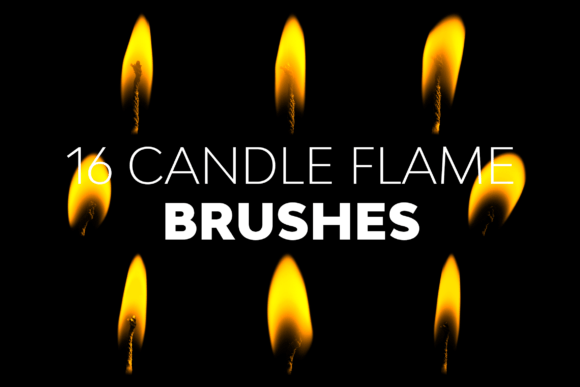
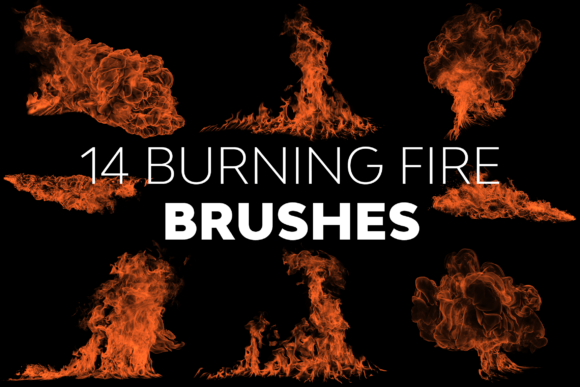
Burning Fire Brushes refer to a collection of custom brush presets compatible with image editing software, specifically Adobe Photoshop. Unlike standard round or square brushes that apply solid color or texture based on opacity and flow, these brushes contain complex alpha channels representing specific stages of combustion. A set typically includes variations such as licking flames, embers, smoke integration, and high-intensity cores. The primary utility lies in efficiency; rather than manually painting every flicker and gradient, an artist can apply a single stroke to generate a volumetric, textured representation of fire.
The technical specifications of these assets play a significant role in their performance. High-resolution brushes, such as those ranging from 2436 pixels up to 4974 pixels, ensure that the details remain sharp even when scaled up for large format prints or cinematic backgrounds. Lower resolution brushes may appear pixelated or muddy when enlarged, breaking the immersion of the artwork. Therefore, the resolution capability is a critical metric for evaluating whether a specific set meets professional standards.
Key Benefits for Workflow Efficiency
The most immediate advantage of utilizing Burning Fire Brushes is the acceleration of the rendering process. Creating realistic fire from scratch requires a deep understanding of light physics, color temperature gradients, and particle dynamics. By leveraging pre-designed brushes, artists can focus more on composition, lighting placement, and narrative storytelling rather than getting bogged down in the minutiae of texture generation.
- Consistency: These brushes provide a uniform style across multiple strokes, ensuring that the fire elements in a scene look cohesive.
- Detail Retention: High-resolution presets allow for intricate details that might be time-consuming to paint manually, such as the fine wisps of smoke or the jagged edges of a flame.
- Versatility: Many sets include distinct versions, allowing users to mix and match different flame shapes to create unique, non-repetitive effects.
Furthermore, compatibility is a major factor in adoption. Assets designed to work seamlessly across a wide range of software versions, from CS6 to CC 2022, reduce the risk of installation errors or feature incompatibility. This broad support ensures that both legacy users and those on the latest updates can utilize the same resources without friction.
Tradeoffs and Considerations
While the benefits are clear, there are tradeoffs to consider before integrating these brushes into a project. The primary concern is the potential for overuse. Because the brushes are so effective at generating instant detail, there is a risk of creating imagery that looks generic or "stamped." If an artist relies too heavily on the default settings without adjusting opacity, flow, or color blending modes, the result may lack the organic imperfection found in real-world fire.
Additionally, while the brushes provide the base shape and texture, they do not replace the need for post-processing. To achieve a truly immersive experience, the fire elements often require additional manipulation, such as adding glow layers, adjusting color balance to match the scene's lighting, or compositing them with background elements. Users should expect to spend time refining the output rather than expecting a perfect final render immediately after application.
When Are These Brushes the Right Fit?
Burning Fire Brushes are particularly well-suited for specific scenarios where speed and visual impact are prioritized. They are an excellent choice for concept artists working under tight deadlines who need to establish mood and atmosphere quickly. For example, in game design or film storyboarding, the ability to rapidly iterate on fire effects allows teams to explore various visual directions without delaying production.
They are also ideal for illustrators working on fantasy or sci-fi themes where stylized, dramatic fire is a central element. In these contexts, the exaggerated or hyper-detailed nature of the brushes can enhance the fantastical quality of the piece. Furthermore, designers creating marketing materials, posters, or album covers often benefit from the high-contrast, eye-catching nature of these assets to draw viewer attention.
When to Consider Alternatives
Despite their utility, there are situations where alternatives may be more appropriate. If a project demands photorealism for a specific commercial product shot or a documentary-style visualization, procedural generation methods or 3D simulation software (such as Blender or Houdini) might yield superior results. These tools calculate fluid dynamics and light interaction in real-time, offering a level of physical accuracy that static brush presets cannot replicate.
Similarly, if an artist is seeking to develop a unique, signature style that avoids common tropes, relying on pre-made brushes might limit creative expression. In such cases, hand-painting fire effects or creating custom brushes from scratch could be a better investment of time to ensure the final output is entirely original.
Practical Decision-Making Insights
Before committing to a specific set of Burning Fire Brushes, it is prudent to evaluate the documentation and support available. A comprehensive Readme file is invaluable, as it guides users through installation and usage, reducing the learning curve. It should clarify how to adjust settings for different artistic intents and troubleshoot common issues.
Consider the following checklist when evaluating a purchase or download:
- Resolution Check: Verify that the maximum resolution (e.g., 4974 px) aligns with your output requirements.
- Software Compatibility: Confirm that the brushes support your current version of Photoshop.
- Support Availability: Ensure that the provider offers accessible customer support for technical difficulties.
- Customization Potential: Assess whether the brushes allow for easy modification of color and texture.
Ultimately, the decision to use these brushes should hinge on how well they integrate into your existing workflow and whether they help you achieve your visual goals without compromising the integrity of your art. By balancing the efficiency of pre-made assets with the necessary manual refinement, artists can harness the power of Burning Fire Brushes to create compelling, fiery visuals that resonate with their audience.