Gingerbread Stamp Brushes for Procreate
The holiday season brings a unique set of creative challenges, particularly for digital artists and planners who want to capture the warmth and nostalgia of winter without spending hours drawing intricate details from scratch. For professionals using the iPad, finding tools that balance efficiency with artistic flair is essential. The Gingerbread Stamp Brushes for Procreate offer a practical solution for creators looking to add festive charm to their digital projects instantly. These brushes are not just decorative; they are functional assets designed to streamline workflows for planners, educators, and small business owners alike.
Enhancing Digital Planning and Journaling
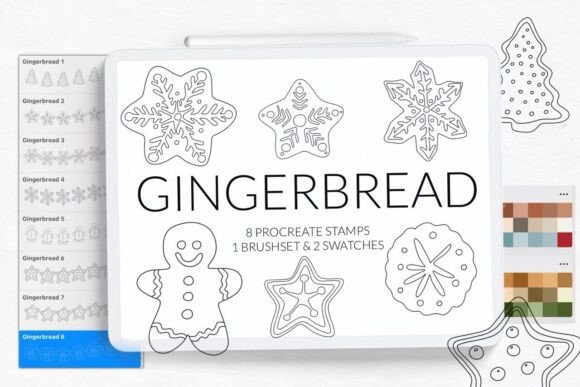
For the modern bullet journal enthusiast or professional planner, consistency in design can be as important as the content itself. Maintaining a cohesive theme throughout a monthly or yearly spread often requires repetitive drawing tasks that can slow down productivity. The Gingerbread stamp brushes for Procreate included 8 stamps with different gingerbreads, allowing users to populate pages with variety while maintaining a unified aesthetic. Instead of redrawing a gingerbread man or house multiple times, you can simply tap the screen to place the element exactly where it belongs.
This capability transforms the planning process. Imagine creating a holiday-themed weekly layout where each day is marked by a unique gingerbread character. With these stamps, you can quickly visualize schedules, decorate headers, or create visual cues for special events. The ability to vary the orientation and size of the stamps means your layout remains dynamic rather than monotonous. This is particularly valuable for entrepreneurs who use digital planners to manage client meetings or project deadlines during the busy end-of-year period.
Streamlining Coloring Page Creation
Educators and publishers often need to produce high-quality coloring pages for children or adult activity books. Drawing complex line art for every single page can be time-consuming, especially when tight deadlines are involved. The Gingerbread Stamp Brushes for Procreate serve as an excellent resource for rapid prototyping and finalizing designs. By utilizing the eight distinct gingerbread shapes, creators can assemble scenes that tell a story or teach concepts like counting, sorting, or storytelling.
The precision of digital stamps ensures that every copy of the gingerbread figure is identical in quality, which is crucial for print-ready materials. Whether you are designing a worksheet for a kindergarten classroom or a sophisticated coloring sheet for a holiday newsletter, these brushes provide the structural elements needed to build a complete illustration. You can layer these stamps, add hand-drawn backgrounds, and incorporate the provided swatches to create a polished final product that looks professionally illustrated.
Supporting Kids' Crafts and Family Activities
Digital creativity is increasingly becoming a family activity. Parents and educators often look for ways to engage children in tech-based crafts that still feel tactile and fun. The Gingerbread stamp brushes for Procreate included 8 stamps with different gingerbreads, making them perfect for kids craft sessions on the iPad. Children can experiment with placing characters, changing colors, and building their own gingerbread villages without the mess of glue or paint.
This tool supports developmental goals such as fine motor skills and spatial awareness. When a child taps the screen to place a stamp, they are learning about composition and arrangement. Furthermore, parents can use these brushes to create personalized holiday cards or invitations. The process becomes collaborative: the parent sets up the scene, and the child decorates it with the available stamps. This interaction strengthens communication and shared creativity within the family unit.
Technical Specifications and Compatibility
Before integrating new tools into your workflow, it is vital to understand the technical requirements. These Gingerbread Stamp Brushes for Procreate are designed exclusively for the iPad Procreate application. You will receive 1 brushset file containing the full collection and 2 gingerbread swatches to help you match the traditional holiday color palette immediately upon installation.
It is important to note a critical compatibility detail: for Procreate version 4.0 or earlier, the brushset file format is not available. If you are using an older device or have not updated your software, you must utilize the individual .brush files instead. This distinction ensures that all users, regardless of their specific hardware generation, can access the creative benefits of these tools.
How to Install Your Brushes Efficiently
Getting started with new digital assets should be a seamless part of your creative routine. Depending on your iPad's operating system and your Procreate version, there are two primary methods to install the Gingerbread stamp brushes for Procreate. Choosing the correct method prevents frustration and ensures the brushes appear correctly in your library.
Method One: Using the Share Menu (Older iPads)
If you have an older iPad or are running Procreate version 4.0 or earlier, follow these steps to import the .brush files:
- Download the folder containing the .brush file to your Files app on your iPad.
- Open the folder and locate the specific .brush files you wish to install.
- Tap and hold the file with your finger or Apple Pencil until the context menu appears.
- Select "Share" from the menu options.
- If the option "Open in Procreate" is missing from the immediate list, click on "More."
- Scroll through the available apps and find "Open in Procreate," then toggle it on and click it.
- Once imported, open your project in Procreate and click the brush icon at the top right corner to access your new stamps.
Method Two: Direct Import (Newer Versions)
For users with newer iPads and updated versions of the app, the process is even more direct:
- Open Procreate and navigate to the Brush Library.
- Click on "New Collection" or the "+" icon next to your existing collections.
- Select "Import" from the menu options.
- Browse your files to find the folder with the downloaded brush.
- Select the brushset or individual files, and they will be added to Procreate automatically.
Strategic Use Cases for Professionals
While the whimsical nature of gingerbread might seem limited to casual crafting, these tools offer significant value for professionals. Marketers creating social media graphics for the holidays can use these stamps to add instant brand personality to posts. Bloggers writing about seasonal recipes or gift guides can illustrate their articles with custom graphics that stand out from generic stock photos.
Small business owners selling digital products can also leverage these assets. By combining the 8 stamps with different gingerbreads, you can create exclusive bundles for your customers, such as printable party invitations or digital stickers. The inclusion of 2 gingerbread swatches further aids in maintaining color consistency across your brand materials, ensuring that your visuals look cohesive whether viewed on a screen or printed on paper.
Maximizing Creative Output
The true power of the Gingerbread Stamp Brushes for Procreate lies in their ability to reduce friction in the creative process. When the barrier to entry for adding detailed illustrations is low, creators are more likely to experiment and produce higher volumes of work. Whether you are filling a planner, designing a coloring book, or engaging children in a digital craft session, these brushes provide the necessary components to bring your vision to life quickly.
Remember that while these stamps save time, they do not replace the need for good design principles. Consider how you arrange the elements on your canvas, how you balance the composition, and how you use the provided swatches to enhance readability. By treating these brushes as foundational elements rather than finished products, you can achieve professional results that resonate with your audience.