Feather Creator Brushes - Procreate X 29
For digital artists and DIY enthusiasts, the texture of a medium often dictates the soul of the final piece. When working within the Procreate App, having access to tools that mimic the organic complexity of traditional media is essential for creating work that feels authentic rather than synthetic. The Feather Creator Brushes - Procreate X 29 pack addresses this specific need by offering a suite of dynamic, pressure-sensitive instruments designed to replicate the intricate details of avian plumage, quills, and natural speckles. Unlike static clip art or pre-made stamps, these brushes allow for real-time manipulation, giving creators the freedom to draw unique elements from scratch.
This collection is particularly valuable for professionals and hobbyists who bridge the gap between digital efficiency and hand-crafted aesthetics. Whether you are designing greeting cards, planning scrapbook layouts, or preparing assets for print-on-demand services, the ability to generate custom feather textures on an iPad Pro can significantly elevate the quality of your output. By integrating these tools into your workflow, you move beyond simple illustration into the realm of detailed textural design.
Dynamic Textures Over Static Stamps
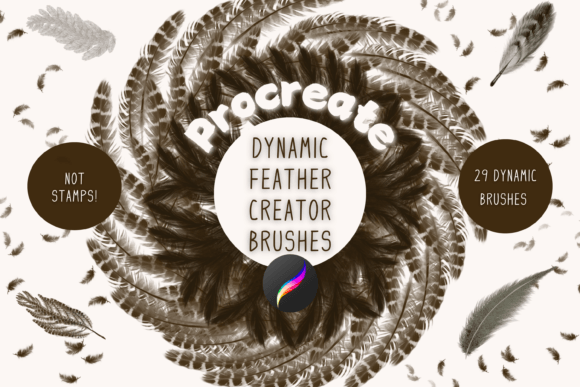
A common limitation in digital crafting is the reliance on static image files. While stamps and pre-drawn clip art offer speed, they often lack the variability required for high-end design. Every feather in nature is unique; a stamp, however, repeats the exact same pattern indefinitely. The Feather Creator Brushes - Procreate X 29 solves this by functioning as true drawing tools. Each of the 29 individual brushes is fully dynamic, responding to the pressure and tilt of your Apple Pencil.
This distinction is critical for projects requiring realism or artistic flair. For instance, when creating wall art or wrapping paper patterns, repetition can become visually monotonous if the source material is too uniform. With these brushes, you can vary the stroke width, opacity, and direction with every pass. You might use a light touch to create delicate down feathers and apply more pressure for bold wing plumage. This level of control ensures that no two strokes are identical, allowing you to build compositions that feel alive and hand-drawn.
The Versatility of the Brush Set
The pack is structured to cover a wide range of textural needs, ensuring that users have the right tool for various stages of their creative process. The core of the collection includes specific Feather creator brushes, each paired with an additional colour variance version. This dual approach allows for rapid experimentation with depth and shading without needing to manually adjust color palettes constantly.
Beyond standard feathers, the set includes specialized tools such as:
- Wing plumage creator brushes: Designed to handle the complex layering found in larger wings, ideal for realistic bird illustrations or fantasy creature design.
- Quill brush: Perfect for adding fine, linear details or sketching the structural framework of a design before filling it in with softer textures.
- Speckle brush: An essential tool for adding grit, noise, or background texture, which helps blend digital elements together and prevents them from looking too "clean" or artificial.
These variations make the Feather Creator Brushes - Procreate X 29 suitable for diverse applications. A graphic designer might use the speckle brush to add vintage character to a wedding invitation, while an illustrator could utilize the wing plumage tools to bring a character's costume to life.
Practical Applications for DIY and Commercial Projects
The utility of these digital brushes extends far beyond personal sketches. They are engineered to support a wide array of DIY projects and commercial ventures where high-quality visual assets are required. Because the brushes generate vector-like quality raster images (depending on resolution settings), the resulting artwork is often suitable for both screen display and physical printing.
Greetings Cards and Invitations
In the market for personalized stationery, unique imagery is a key selling point. Using the Feather Creator Brushes - Procreate X 29, you can design bespoke borders, focal points, or background patterns for greetings cards and invitations. Instead of purchasing expensive stock photos or licensing generic clip art, you can create original designs that match your brand or personal style exactly. The pressure sensitivity allows for elegant, flowing lines that convey sophistication, making them ideal for formal events like weddings or baby showers.
Scrapbooking and Mixed Media
For scrapbookers who enjoy blending digital and physical media, these brushes offer a seamless way to enhance printed pages. You can create custom journaling prompts, decorative corners, or thematic accents using the quill and feather brushes, then print them out to adhere to your physical albums. This hybrid approach saves time compared to cutting and pasting physical materials while retaining the tactile feel of a handmade project.
Print on Demand and Wall Art
Entrepreneurs utilizing print-on-demand platforms need scalable, high-resolution assets. The dynamic nature of these brushes means you can create large-scale patterns for wrapping paper, fabric prints, or canvas wall art without pixelation issues, provided you work at a sufficient resolution in Procreate. The ability to create seamless patterns using the speckle and plumage brushes opens up opportunities for selling digital downloads or physical goods on marketplaces like Etsy or Shopify.
Technical Requirements and Workflow Integration
To leverage the full potential of the Feather Creator Brushes - Procreate X 29, understanding the technical ecosystem is necessary. These files are not universal; they are specifically formatted for the Procreate App on iOS devices. Consequently, they will not function in other digital art software like Photoshop or Clip Studio Paint.
Hardware compatibility is also a strict requirement. You must have an iPad Pro (or compatible iPad model) with the Procreate App installed and an Apple Pencil. The pressure sensitivity that defines the quality of these brushes relies entirely on the hardware capabilities of the Apple Pencil. Without this setup, the brushes cannot be used effectively, as the dynamic response to touch pressure is lost.
Installation and Import Process
Once you have acquired the files, the installation process involves a few specific steps to ensure they appear correctly in your app. Since these are digital downloads, you will first need a platform to store the files, such as iCloud Drive or Dropbox. After downloading, the files typically arrive in a compressed format (zip file).
- Unzipping the Files: You will need a program capable of unzipping files on your iPad, such as iZip or the built-in Files app. Locate the downloaded zip file and extract its contents.
- Locating the Procreate File: Inside the extracted folder, you should find a file with the .brushset extension. This is the native format for Procreate.
- Importing to Procreate: Open the Procreate App. Navigate to the brush library and select the option to import or share. Choose the .brushset file from your storage location.
- Automatic Organization: Upon selection, Procreate will automatically import the brushes into a named folder within your library, keeping your workspace organized.
This streamlined import process ensures that once the initial setup is complete, the brushes are ready for immediate use, saving you time on configuration so you can focus on creation.
Who Benefits Most From This Tool?
While any Procreate user can appreciate the aesthetic value of these brushes, certain groups will find the Feather Creator Brushes - Procreate X 29 particularly transformative.
Small Business Owners and Entrepreneurs who produce printables or physical goods will benefit from the ability to create proprietary designs quickly. By avoiding copyright issues associated with generic clip art, they can build a distinct brand identity.
Educators and Hobbyists teaching art or crafting can use these brushes to demonstrate techniques in texturing and layering. The visual feedback provided by the pressure-sensitive tools makes learning about weight and flow more intuitive.
Freelance Designers working on tight deadlines will appreciate the efficiency of having a dedicated set for organic textures. Rather than spending hours searching for the perfect photo reference or trying to recreate a feather stroke from scratch, these brushes provide a reliable starting point that can be customized instantly.
Considerations for Potential Users
Before investing time in mastering these tools, it is important to consider the limitations. As noted, the ecosystem is closed; if you do not own an iPad and Apple Pencil, these brushes are incompatible with your current setup. Additionally, because these are dynamic brushes and not stamps, they require a degree of manual dexterity. Users accustomed to simply placing pre-made images may need to practice to achieve consistent results with the pressure-sensitive strokes.
However, for those willing to engage with the drawing process, the payoff is significant. The Feather Creator Brushes - Procreate X 29 offers a balance between the speed of digital tools and the authenticity of traditional media. By integrating these brushes into your workflow, you gain the flexibility to adapt your art to any project, from intimate scrapbook pages to large-scale commercial prints, all while maintaining a unique, handcrafted signature.