Evaluating the Wet and Dry Brushes Pack for Procreate
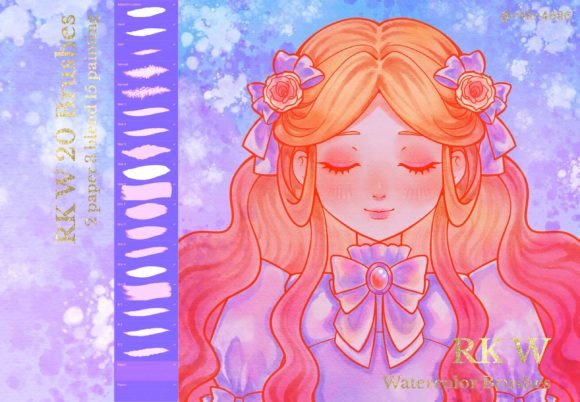
Digital illustration has evolved significantly, moving beyond simple vector lines to mimic the complex behaviors of traditional media. For artists using Apple's Procreate app on iPad, the choice of digital tools often dictates the quality and feel of the final artwork. The Wet and Dry Brushes Pack for Procreate represents a specific category of assets designed to bridge the gap between digital precision and organic texture. This pack typically includes a curated selection of watercolor brushes, wet brushes, dry brushes, gouache brushes, and paper texture brushes, all engineered to respond to the nuances of the stylus input.
Understanding what this collection offers is essential for anyone considering expanding their digital toolkit. Unlike standard flat markers or airbrushes found in the default library, these brushes utilize advanced engine settings to simulate fluid dynamics, pigment absorption, and surface roughness. They are designed to replicate the unpredictable nature of real-world painting while maintaining the undo capabilities and layer flexibility of a digital workflow.
Core Functionality and Technical Requirements
The primary function of the Wet and Dry Brushes Pack for Procreate is to provide realistic rendering of mixed media. The "wet" components focus on simulating how water interacts with pigment, allowing colors to bleed, bloom, and settle naturally on a virtual canvas. Conversely, the "dry" components aim to recreate the resistance and graininess of charcoal, pastel, or dry brush techniques where the bristles skip over the high points of the paper texture.
A critical technical consideration for users is the hardware requirement. It is strongly recommended to use an Apple Pencil to get the most out of these brushes. Most brushes within the pack are set to support pressure sensitivity, tilt recognition, and palm rejection. Without the dynamic range provided by the Apple Pencil, the nuanced control required to vary stroke width, opacity, and flow based on hand pressure is lost. Using a finger or a basic stylus will result in static strokes that fail to capture the intended artistic effect.
Furthermore, it is important to note a significant platform limitation: Procreate brushes can only be used in Procreate. These files are proprietary to the application and cannot be exported to other software such as Adobe Fresco, Clip Studio Paint, or desktop-based programs like Photoshop. This exclusivity means that purchasing or downloading this pack commits the user to the Procreate ecosystem for any work utilizing these specific assets.
Reasons to Consider the Brush Pack
Artists might be interested in this collection for several practical reasons. First, it accelerates the workflow for those seeking a traditional aesthetic without the mess and cost of physical supplies. Setting up a traditional watercolor station requires water, paper, paints, and drying time. With the Wet and Dry Brushes Pack for Procreate, an artist can achieve similar visual results instantly, making it ideal for quick concept art, storyboarding, or plein air digital sketching.
Second, the inclusion of specific textures, such as paper texture brushes, adds depth that is difficult to achieve with smooth digital gradients. Digital art can sometimes appear too sterile or "perfect." These brushes introduce imperfections, grain, and variation that give the artwork a tactile quality. For illustrators working on children's books, greeting cards, or editorial pieces where a handcrafted look is desired, these tools are highly effective.
Additionally, the versatility of having both wet and dry options in one pack allows for hybrid techniques. An artist can lay down a wash of color using a wet brush and then add definition and highlights using a dry brush, mimicking the layering process of traditional gouache or acrylic painting. This flexibility supports a broader range of styles within a single project.
Benefits, Tradeoffs, and Expectations
The benefits of integrating this pack into a workflow are clear: enhanced realism, time efficiency, and creative freedom. However, there are tradeoffs to consider. One major factor is the learning curve. While the brushes are designed to be intuitive, mastering the timing of "wet" effects—such as knowing when to apply a stroke before the previous one dries digitally—requires practice. Users expecting immediate perfection may find the behavior initially frustrating if they do not understand the underlying simulation mechanics.
Another tradeoff involves performance. High-fidelity brushes that simulate complex particle interactions and texture blending can be more demanding on the iPad's processor than simple line tools. On older devices, users might experience slight lag or stuttering when using multiple layers of heavy texture brushes simultaneously. It is an expectation that performance may vary depending on the specific model of the iPad being used.
Furthermore, while the brushes mimic reality, they do not perfectly replicate every nuance of physical paint. There is a limit to how much the software can predict the chaotic behavior of actual water and pigment. Artists must adjust their expectations to understand that these are simulations, not magic replacements. The result is often "digital realism," which looks authentic but retains the clean edges and perfect blending inherent to screen-based creation.
Situations Where the Pack is a Strong Fit
The Wet and Dry Brushes Pack for Procreate is an excellent fit for illustrators who specialize in soft, organic subjects. Portraits, landscapes, and botanical illustrations benefit immensely from the ability to blend colors softly and create atmospheric effects. If a project requires a textured background or a sense of age and wear, the paper texture brushes included in the pack provide a solid foundation.
It is also a strong choice for educators and students teaching digital art fundamentals. By using brushes that behave similarly to traditional tools, instructors can help students transition their understanding of pressure, stroke direction, and medium properties from the physical world to the digital realm. The tactile feedback provided by the Apple Pencil combined with these responsive brushes creates a pedagogical bridge that aids skill transfer.
For professional freelancers who need to deliver diverse styles quickly, this pack offers a streamlined solution. Instead of creating custom brushes for every client request involving watercolor or gouache effects, the artist can rely on the pre-configured settings within the pack to meet deadlines without sacrificing quality.
When Alternatives May Be Worth Considering
Despite its strengths, this pack may not be the right choice for every artist. Those working primarily in hard-surface design, architectural visualization, or technical illustration will likely find little value in watercolor or dry brush textures. In these fields, precision, sharp lines, and clean vectors are paramount, and the organic unpredictability of these brushes could hinder rather than help the workflow.
Additionally, artists who require cross-platform compatibility should reconsider. If a workflow involves starting a piece on an iPad and finishing it on a desktop computer in Photoshop, the inability to export Procreate brushes makes this pack less viable. In such cases, investing in universal brush formats or native brushes for each software environment would be a more strategic decision.
Finally, for those on a strict budget who already possess a robust library of free brushes, the incremental gain from a paid pack must be weighed carefully. Many free resources exist that offer similar wet and dry effects. Unless the specific textures or unique behaviors of the RK W 🖌️✨ collection address a specific gap in the artist's current toolkit, the investment might not yield a proportional return.
Practical Decision-Making Insights
Before deciding to adopt the Wet and Dry Brushes Pack for Procreate, artists should conduct a personal audit of their current needs. Ask whether your current style relies heavily on texture and fluidity. If your work is predominantly line art or flat color, this pack may remain unused in your library. Test the brushes on a demo file if possible, paying close attention to how they react with your specific Apple Pencil and iPad model.
Consider the long-term goals of your portfolio. If you aim to develop a signature style that blends digital convenience with traditional charm, this pack provides the necessary building blocks. However, if your goal is hyper-realism or 3D integration, other specialized tools might serve you better. Ultimately, the value of these brushes lies in how well they align with your artistic vision and technical constraints. By evaluating the balance between the desire for organic texture and the realities of digital limitations, artists can make an informed choice about whether this toolset enhances their creative potential.