Camera Procreate Stamp Brushes: 50 Creative Tools
Digital illustration often suffers from a certain sterility, a polished perfection that can feel distant from the raw energy of analog art. For creators who crave texture and immediate visual impact, standard vector tools sometimes fall short. This is where specialized assets like Camera Procreate Stamp Brushes become essential. These are not merely decorative elements; they are functional shortcuts designed to inject character, history, and narrative depth into your digital compositions with a single tap.
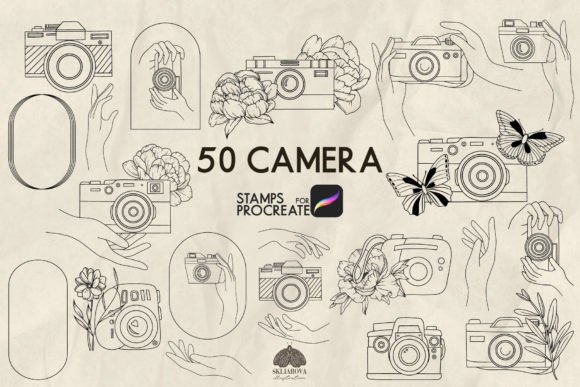
The specific set we are exploring today offers a robust toolkit for designers and artists alike. It includes fifty distinct camera stamps, hand illustrations holding cameras, and pre-made logo variations featuring camera motifs. The true power of this collection lies in its flexibility. Unlike static image overlays, these brushes allow you to change the color, size, and opacity of each stamp instantly. This adaptability transforms them from simple clipart into dynamic components of your creative workflow, suitable for everything from mood boards to final client deliverables.
Understanding the Versatility of Stamp Brushes
To appreciate the value of these tools, one must understand how stamp brushes function within the Procreate ecosystem. A stamp brush captures a high-resolution raster image and applies it as a texture. When you use the Camera Procreate Stamp Brushes, you are essentially painting with photography icons rather than pixels or vectors. This distinction is crucial for maintaining a cohesive aesthetic when blending different media.
The ability to manipulate color is perhaps the most significant feature. In many design projects, a black-and-white icon simply will not work against a vibrant background. With this set, you can match the hue of the camera stamp to your brand palette or the lighting conditions of your scene. Similarly, adjusting opacity allows for subtle layering. You might place a faint camera outline behind a subject to suggest a theme without overpowering the main focal point, creating depth through transparency rather than heavy shadows.
Practical Applications for Designers and Marketers
For marketers and small business owners, time is a currency as valuable as creativity. These brushes offer a rapid solution for generating social media graphics, blog headers, and promotional materials. Imagine creating a series of Instagram posts for a photography workshop. Instead of spending hours designing custom icons, you can utilize the pre-made logo stamps to create consistent branding across all posts. By varying the size and color, you can establish a visual hierarchy that guides the viewer's eye naturally.
Bloggers and content creators can also leverage these assets to break up walls of text. A well-placed camera stamp can serve as a bullet point alternative or a section divider, adding a thematic touch that reinforces the subject matter. Because the set includes hands holding cameras, you have the option to introduce a human element to your designs. This is particularly effective for storytelling content, where the perspective of the photographer is central to the narrative.
Creative Directions for Artists and Hobbyists
Beyond commercial applications, these brushes open up a world of artistic experimentation for hobbyists and professional illustrators. The inclusion of fifty different camera styles means you can explore various eras of photography, from vintage box cameras to modern DSLRs. This variety encourages artists to play with juxtaposition, placing an antique camera stamp in a futuristic cityscape or using a sleek modern lens on a rustic, textured background.
One compelling approach is to use the brushes for collage art. Digital collage thrives on the mixing of disparate elements. By changing the opacity of the camera stamps, you can blend them seamlessly with scanned paper textures or watercolor washes. The result is a piece that feels tactile and layered, bridging the gap between traditional mixed media and digital convenience. The hands included in the set add a unique dimension here, allowing you to create scenes where the act of photographing is part of the composition itself.
Building Consistent Brand Identities
Consistency is the cornerstone of strong branding, yet achieving it can be challenging when working across multiple platforms. The Camera Procreate Stamp Brushes provide a standardized set of assets that ensure your visual language remains uniform. Whether you are designing a business card, a website banner, or a presentation slide, using the same brush set guarantees that the style of your imagery aligns perfectly.
Freelancers and entrepreneurs should consider organizing their workspace to maximize efficiency. Create a dedicated folder in Procreate specifically for these stamp brushes. Within this folder, you can save swatches of your brand colors so that applying the correct hue to a stamp becomes a two-step process. This organization reduces friction in your workflow, allowing you to focus on the creative decisions rather than technical adjustments.
Techniques for Effective Integration
While these brushes are powerful, their effectiveness depends on how they are integrated into your project. A common mistake is overusing stamp elements, which can make a design look cluttered or amateurish. To avoid this, treat each stamp as a deliberate choice. Ask yourself what role the camera icon plays in the composition. Is it a focal point? A subtle texture? Or a navigational cue?
When working with the pre-made logos, remember that less is often more. Use the larger, more detailed stamps for hero images or cover art where visibility is key. For smaller applications, such as watermarks or footer details, opt for simpler shapes and lower opacity settings. This variation in scale helps maintain visual interest without overwhelming the viewer.
Color theory also plays a vital role in making these stamps effective. If your background is busy, choose a stamp color that contrasts sharply to ensure legibility. Conversely, if the background is minimal, you might experiment with tonal variations of the same color family to create a sophisticated, monochromatic look. The flexibility of the brush settings empowers you to test these ideas instantly, iterating until the balance feels right.
Adapting for Different Audiences
Different audiences respond to different visual cues. When targeting a younger demographic, you might lean towards brighter, bolder colors and more stylized camera representations. For a corporate or educational audience, a more subdued, realistic approach may be preferable. The diversity within the fifty-camera set allows you to tailor your output to these specific needs without requiring external resources.
Educators and publishers can use these brushes to enhance instructional materials. Diagrams explaining camera settings or photography techniques become more engaging when illustrated with clear, recognizable icons. The ability to resize the stamps ensures they fit neatly into complex layouts, maintaining readability while adding visual appeal.
Final Thoughts on Creative Efficiency
The integration of Camera Procreate Stamp Brushes into your digital toolkit represents a shift towards smarter, more efficient creativity. By providing a comprehensive collection of fifty cameras, hands, and logos, this set removes the barriers of asset creation, allowing you to focus on the bigger picture of your project. The control over color, size, and opacity ensures that these tools remain versatile enough to adapt to any context, from casual hobbyist sketches to professional marketing campaigns.
Ultimately, the goal is not just to decorate your work but to enhance communication. Whether you are telling a story, selling a service, or teaching a concept, these brushes offer a practical way to do so with style and precision. Embrace the flexibility they offer, experiment with layering and transparency, and let these digital stamps become an integral part of your unique artistic voice.