Arrow Brushes: Elevating Design with Precision and Style
In the vast landscape of digital design, the tools we choose often define the boundaries of our creativity. While software capabilities have expanded exponentially, the fundamental elements that bring a concept to life remain rooted in texture, shape, and flow. Among these essential assets, Arrow Brushes stand out as a versatile solution for designers seeking to add direction, emphasis, and intricate detailing to their work. Whether you are crafting a social media graphic, designing a complex infographic, or illustrating a fantasy map, the right set of brushes can transform a static image into a dynamic narrative.
The Power of Directional Design
Arrows are more than just symbols pointing from A to B; they are visual cues that guide the viewer's eye and establish hierarchy within a composition. In modern graphic design, the integration of directional elements is crucial for storytelling. However, creating custom arrows from scratch using standard vector tools can be time-consuming and may lack the organic texture that hand-drawn elements provide. This is where high-quality Arrow Brushes become an indispensable asset.
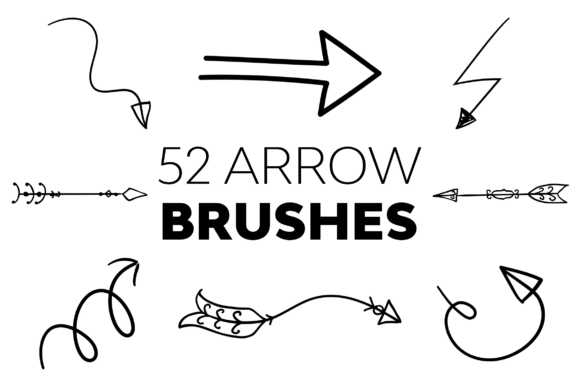
These brushes offer a spectrum of styles, ranging from sleek, geometric pointers to rugged, sketch-like indicators. By utilizing a comprehensive collection, such as a set containing 52 unique variations, designers gain immediate access to a library of pre-made textures. Each brush acts as a digital stamp of creativity, carrying its own identity while remaining flexible enough to adapt to various project needs. The ability to vary opacity, size, and color allows these tools to blend seamlessly into any aesthetic, ensuring that the final output feels cohesive rather than pasted on.
High Resolution and Intricate Detailing
One of the most critical factors when selecting digital assets is resolution. Low-resolution brushes can appear pixelated when scaled up, ruining the professional finish of a design. The Arrow Brushes discussed here are engineered for excellence, boasting resolutions between 3750 and 3752 pixels. This high-definition quality ensures that every stroke remains crisp, whether it is used for a small icon on a mobile screen or a massive billboard advertisement.
The richness of these brushes lies in their ability to hold intricate details. Unlike simple vector shapes, these brushes often incorporate subtle noise, grain, or edge variations that mimic real-world drawing materials. This textural depth adds a layer of sophistication, making the design feel more tangible and less like a sterile computer-generated image. For professionals who pride themselves on the quality of their output, this level of detail is not just a bonus; it is a necessity.
Seamless Integration into Your Workflow
A common concern among creative professionals is the disruption caused by new tools. If a resource requires extensive setup or learning curves, it often ends up gathering digital dust. Fortunately, this array of Arrow Brushes is designed with user experience in mind. They are fashioned to augment your workflow, not hinder it. The installation process is straightforward, allowing artists to jump straight into creation without navigating complex menus or troubleshooting compatibility issues.
To facilitate a smooth design experience, every set includes a detailed Readme file. This document serves as a quick-start guide, offering step-by-step instructions on how to install and utilize the brushes effectively. It also provides tips on achieving specific effects, such as blending modes and layer styles, which can further enhance the visual impact of the arrows. For those who value efficiency, having clear documentation means less time searching for answers online and more time refining the artwork.
Universal Compatibility Across Versions
Software updates can sometimes create friction for designers who rely on third-party assets. Ensuring that a tool works across different environments is vital for long-term usability. These Arrow Brushes are built with broad compatibility in mind, functioning harmoniously with numerous versions of Adobe Photoshop. From the classic CS6 to the latest iterations like CC 2022, the brushes maintain their integrity and performance.
This wide range of support includes:
- Photoshop CS6: Ideal for users working on older hardware or legacy projects.
- Photoshop CC (2015.5 – 2019): Covering the transition period for many studios and freelancers.
- Photoshop CC 2020 – 2022: Ensuring full functionality for those on the cutting edge of technology.
By supporting such a diverse array of versions, these brushes ensure that teams with mixed software environments can collaborate without technical barriers. Everyone can access the same high-quality resources regardless of their specific update status.
Real-World Applications and Scenarios
Understanding the versatility of Arrow Brushes becomes clearer when examining how they are applied in real-world scenarios. Their utility extends far beyond simple navigation markers. Here are several practical examples of how these tools can elevate different types of projects:
Infographics and Data Visualization
Infographics rely heavily on guiding the reader through complex data. Standard arrows can look generic, but textured Arrow Brushes can match the theme of the infographic, whether it is corporate, playful, or industrial. They help break down information into digestible chunks, leading the eye naturally from one statistic to the next. The variety in a 52-brush set allows designers to use different arrow styles to denote different types of relationships or data flows, adding a layer of visual coding to the information.
Social Media Graphics and Marketing Materials
In the fast-paced world of social media, grabbing attention is paramount. Marketing materials often require bold, directional elements to highlight calls to action (CTAs). Using high-resolution Arrow Brushes, designers can create dynamic "Click Here" prompts or point towards sale items in promotional banners. The unique textures prevent the graphics from looking like templates, giving brands a distinct visual voice that stands out in crowded feeds.
Concept Art and Storyboarding
For illustrators and concept artists, speed is often key during the brainstorming phase. Instead of meticulously drawing every directional line, artists can use these brushes to quickly sketch movement vectors, camera angles, or character paths. The organic nature of the brushes helps maintain the raw energy of the initial sketch, making them perfect for storyboards and mood boards where perfection is less important than communication.
Evaluating Suitability for Your Needs
While Arrow Brushes offer significant advantages, it is important to evaluate whether they fit your specific project requirements. Not every design benefits from textured strokes. For instance, ultra-minimalist designs might prefer clean, vector-based lines over the rich detail provided by these brushes. Similarly, if a project requires strict adherence to a corporate style guide that mandates specific geometric shapes, the artistic freedom of these brushes might need to be tempered.
However, for the majority of creative endeavors—especially those aiming for a human touch, a vintage vibe, or a dynamic feel—these brushes are an excellent choice. When evaluating suitability, consider the following:
- Project Scale: Are you working on large-format prints? If so, the 3750+ px resolution is a major advantage.
- Style Consistency: Do the brush textures align with the overall mood of your design?
- Workflow Efficiency: Will using pre-made brushes save you significant time compared to manual drawing?
Support and Reliability
Investing in digital assets is about more than just the files; it is about the reliability of the source. With products like those from UnicDesign, creators benefit from robust support systems. The promise of 24/7 assistance ensures that if any issues arise during installation or usage, help is always available. Users are encouraged to refer to the contact points provided in the Readme file for any queries. This level of dedication fosters trust and peace of mind, allowing designers to focus entirely on their craft.
Conclusion
Ultimately, the goal of any design tool is to unlock potential. Arrow Brushes do exactly that by providing a spectacular array of options that are rich in quality and easy to integrate. They bridge the gap between technical precision and artistic expression, offering a solution that is both functional and beautiful. Whether you are a seasoned professional looking to refine your workflow or a business owner aiming to elevate your brand's visual identity, these brushes represent a smart investment in your creative toolkit.
Don't compromise on the quality of your designs. By choosing tools that prioritize resolution, compatibility, and ease of use, you empower yourself to create work that truly resonates. With a comprehensive set of 52 unique brushes at your fingertips, the only limit left is your imagination.