30 Ink Dynamic Splash Brushes for Design
Digital design often struggles to replicate the chaotic beauty of traditional media. When a designer needs that raw, unpredictable energy of ink hitting paper, standard digital tools can feel too sterile or controlled. This is where specialized assets like 30 Ink Dynamic Splash Brushes become essential. These tools are not merely decorative; they are functional instruments that bridge the gap between digital precision and organic expression. By integrating these brushes into your workflow, you gain the ability to inject authentic texture and movement into projects that might otherwise feel flat.
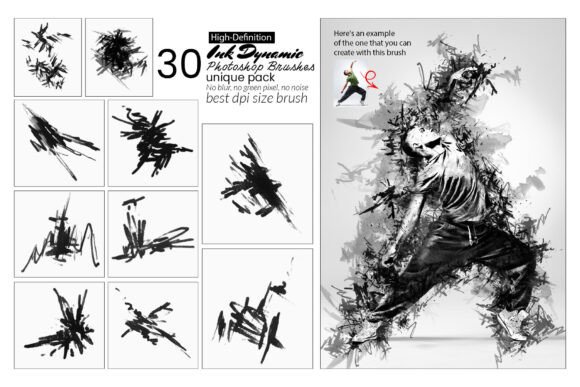
The collection provides thirty distinct brush profiles, each engineered to mimic specific physical interactions of ink with a surface. From the sharp, explosive nature of a splatter to the soft, bleeding edges of a watercolor blotch, these brushes offer a spectrum of textures. For professionals ranging from graphic designers to freelance illustrators, having this variety on hand means less time searching for stock photos of grunge textures and more time refining the actual composition of the artwork.
Enhancing Visual Depth with Organic Textures
One of the primary challenges in digital illustration is creating depth without relying solely on shadows and highlights. Flat colors, even when vibrant, can lack the tactile quality that draws the human eye. The 30 Ink Dynamic Splash Brushes solve this by introducing irregular edges and internal variations in opacity. When applied to a background or a logo element, these brushes create a sense of history and wear, suggesting that the object exists in a real, physical space.
Consider a project involving a music festival poster. A solid black background is effective but generic. By overlaying a few dynamic ink splashes, the design immediately gains an underground, energetic vibe. The brushes allow for layering; you can place a large, chaotic splash at the bottom and refine it with smaller, controlled droplets near the text. This layering technique mimics how ink behaves in reality, where heavier drops sit atop lighter ones, creating a natural hierarchy of visual interest.
Furthermore, these brushes excel at breaking up rigid geometric shapes. In modern branding, logos often rely on clean lines and perfect circles. While professional, they can sometimes appear cold. Adding a subtle ink texture to the edge of a letterform or using a splash as a negative space element can soften the brand identity, making it feel more approachable and human. The versatility of the set ensures that whether you need a subtle grain or a dramatic explosion of color, there is a specific brush profile to match the intent.
Streamlining the Creative Workflow
Efficiency is a critical metric for any creative professional. Creating realistic ink effects from scratch in Photoshop requires a significant investment of time. It involves masking, applying noise filters, adjusting flow dynamics, and manually painting irregular edges. This process is not only tedious but also difficult to replicate consistently across different projects.
With the 30 Ink Dynamic Splash Brushes, this entire process is condensed into a single click. The brushes come pre-configured with complex shape dynamics, scattering settings, and texture maps. This allows artists to focus on the placement and color of the effect rather than the mechanics of generating it. For a freelancer managing multiple deadlines, this time-saving aspect is invaluable. It transforms a task that could take twenty minutes into one that takes ten seconds, freeing up mental bandwidth for higher-level creative decisions.
The inclusion of 30 transparent PNG files alongside the ABR brush format adds another layer of efficiency. Sometimes, a static asset is preferable to a painted stroke. These PNGs can be dragged directly onto a canvas, resized, and blended instantly. This hybrid approach—having both dynamic brushes and static elements—provides flexibility. If a client requests a change to the splash pattern, the artist can either repaint it quickly with the brush or swap out the PNG file without rebuilding the entire layer structure.
Practical Applications Across Industries
The utility of these brushes extends far beyond abstract art. They serve practical functions in various commercial sectors:
- Marketing and Advertising: Campaigns targeting younger demographics often benefit from a "grunge" aesthetic that feels authentic and unpolished. These brushes help create social media graphics that stand out against the sea of perfectly polished corporate content.
- Book Publishing: Cover designers frequently use ink textures to evoke mood. A mystery novel cover might utilize dark, heavy blotches to suggest secrecy, while a children's book might use bright, playful splatters to indicate fun and energy.
- Web Design: Backgrounds for landing pages can suffer from looking too digital. Applying a low-opacity ink splash behind a hero section can add character without distracting from the call-to-action button.
- Personal Branding: Bloggers and influencers often use custom headers and thumbnails. Incorporating these unique textures helps establish a distinct visual identity that separates them from competitors using generic templates.
Technical Compatibility and Customization
A common concern when adopting new digital assets is compatibility. The 30 Ink Dynamic Splash Brushes are designed to work seamlessly with Adobe Photoshop versions from CC2015.5 through the latest releases, including CC2022 and beyond. This wide range of compatibility ensures that users do not need to upgrade their software to access these tools, protecting existing investments in hardware and licenses.
Beyond basic installation, the true power lies in customization. While the default settings provide excellent results, the brushes are fully adjustable within the Photoshop Brush Settings panel. Users can modify the size jitter to make splatters more random or control the opacity flow to create fading effects. This level of control means the brushes are not limited to a single style; they can be adapted to fit the specific lighting conditions or stylistic requirements of any project.
For those who prefer a non-destructive workflow, the brushes integrate well with layer masks and blending modes. By setting a layer to "Multiply" or "Overlay," the ink effects interact naturally with the underlying colors, preserving the integrity of the base design. The included help file further assists users in navigating these settings, ensuring that even those less familiar with advanced brush dynamics can achieve professional results quickly.
Who Benefits Most from This Collection?
This toolset is particularly valuable for individuals who value authenticity in their digital output. Traditional artists transitioning to digital media will find the transition smoother, as the brushes replicate the behaviors they are accustomed to. Similarly, graphic designers who specialize in branding or editorial layout will appreciate the ability to add a human touch to corporate materials.
However, it is important to consider the context. While these brushes are powerful, they may not be suitable for every design brief. Projects requiring strict minimalism or hyper-realistic 3D rendering might find these textures distracting. The key is knowing when to apply them. They are best used as accent elements to enhance a composition rather than as the sole focus, unless the goal is explicitly abstract or grunge-themed.
In conclusion, the 30 Ink Dynamic Splash Brushes represent a practical solution for adding life and character to digital designs. By offering a blend of realism, versatility, and ease of use, they empower creators to produce work that resonates on a deeper emotional level. Whether you are refining a logo, designing a poster, or creating digital illustrations, these brushes provide the necessary tools to elevate your visual communication and streamline your creative process.