25 Black Cat Brushes and Png Files: A Practical Guide for Digital Creators
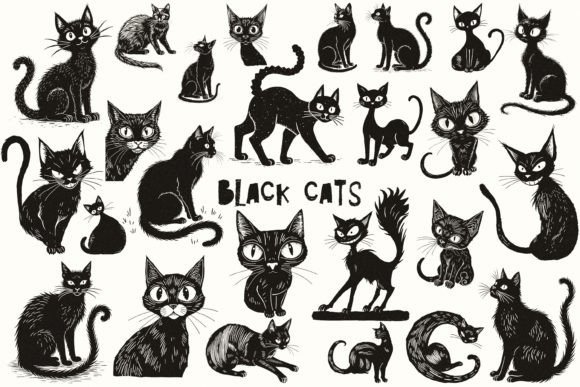
Black cats have long been a staple of gothic aesthetics, Halloween designs, and whimsical digital art. For designers, scrapbookers, and small business owners, having high-quality assets at your fingertips can be the difference between a generic project and a standout piece. The 25 Black Cat Brushes and Png Files collection offers exactly that: a versatile toolkit containing 25 distinct cat illustrations available as both Photoshop brushes and transparent PNG images. Each file is individually saved at 300dpi with a maximum dimension of 5000 pixels on the longest side, ensuring crisp edges whether you are printing a large wall mural or designing a tiny social media icon.
While the specifications sound impressive on paper, simply downloading a pack of digital assets does not guarantee a professional result. Many creators make the mistake of assuming that "high resolution" automatically translates to "print-ready" without verifying how the files behave in their specific workflow. Understanding the nuances of these files—how they were created using AI and refined manually in Photoshop—is crucial to leveraging them effectively for sublimation, junk journaling, or commercial print projects.
Understanding the Asset Quality and Versatility
The primary value of this set lies in its dual format. You receive Photoshop brushes, which allow for quick, organic application of textures and shapes, and PNG files, which offer precise placement and control. This combination is particularly useful for mixed-media projects like decoupage or collage, where you might need to layer elements over physical textures. The 300dpi resolution is the industry standard for print, meaning these graphics will not appear pixelated when printed on cards, invitations, or fabric for sublimation.
However, the origin of these images matters. These graphics were generated with the help of AI and then meticulously edited by a human artist in Photoshop. This hybrid approach combines the speed of generative AI with the precision of manual retouching. The result is often cleaner than raw AI output, but it requires the user to understand what they are working with. Unlike vector graphics, which scale infinitely without quality loss, these are raster images. While 5000 pixels is substantial, stretching a 5000-pixel image to cover a billboard will eventually degrade the quality. Knowing the limits of raster files is the first step in avoiding costly printing errors.
Common Mistakes When Using High-Resolution Raster Assets
One of the most frequent errors creators make is ignoring the color mode. Many digital downloads are created in RGB (Red, Green, Blue), which is perfect for screens but problematic for professional printing. If you plan to use these black cat images for a physical product like a t-shirt or a greeting card, you must convert them to CMYK (Cyan, Magenta, Yellow, Key/Black) before sending them to the printer. Failing to do so can result in colors that look vibrant on your monitor but appear dull or muddy on paper. Specifically, deep blacks in RGB often turn out as dark grays or purples in CMYK if not adjusted correctly.
Another overlooked detail involves the background transparency. While PNG files are designed to have transparent backgrounds, low-quality exports sometimes leave behind faint white halos around the subject. This is especially noticeable when placing a black cat against a light-colored background in a scrapbook layout or a website banner. Always inspect the edges of your downloaded files at 100% zoom before committing them to a design. If you spot jagged edges or semi-transparent artifacts, use a masking tool in Photoshop to clean up the silhouette. This simple step elevates the perceived quality of your entire project.
Maximizing Efficiency in Your Workflow
Efficiency is key for freelancers and small business owners who manage tight deadlines. The brush format included in this set allows for rapid prototyping. Instead of dragging and dropping individual PNGs, you can paint multiple cat silhouettes instantly, varying the size and opacity with each stroke. This is ideal for creating patterned backgrounds or textured overlays for junk journals. However, a common pitfall is relying too heavily on the brush tool without adjusting the dynamics. If every brush stroke looks identical, the design feels repetitive and artificial.
To avoid this, experiment with the brush settings in Photoshop. Adjust the shape dynamics, scattering, and texture options to create variation. Even though the base image is an AI-generated edit, introducing randomness through brush settings mimics natural hand-drawn imperfections. This makes the final composition feel more organic and less "stamped." For example, when creating a Halloween invitation, vary the size of the cats and rotate them slightly so they appear to be moving rather than standing in a rigid line.
Evaluating Suitability for Specific Projects
Before integrating these assets into a client project or a product line, consider the end-use environment. For sublimation printing, the clarity of the black ink is critical. Since these images feature black cats, ensure that the darkest tones are rich enough to transfer well onto polyester fabrics. Sometimes, pure black (#000000) does not translate well in sublimation; a very dark gray or a custom black mix might yield better results depending on your specific machine and ink brand. Test print a sample before producing a full batch.
For digital applications like web banners or social media posts, the 5000-pixel resolution is likely overkill. Downscaling these massive files unnecessarily increases your storage load and slows down page load times. It is best practice to export a copy of the image optimized for the web (usually 72dpi and significantly smaller dimensions) while keeping the original 300dpi master file safe for future print needs. Managing your file sizes properly ensures that your workflow remains smooth and your digital assets remain accessible without cluttering your hard drive.
Best Practices for Long-Term Use
To get the most out of the 25 Black Cat Brushes and Png Files, organize your library systematically. Do not just drop the files into a generic folder. Create subfolders based on usage type, such as "Print Ready," "Web Optimized," and "Brushes." This organization saves valuable time when you are rushing to meet a deadline. Additionally, keep a record of the license terms associated with these files. While many packs are sold for personal and commercial use, some may have restrictions on reselling the raw files themselves. Clarifying these terms protects you from potential legal issues and ensures ethical usage within your creative community.
Finally, remember that these assets are tools, not finished products. The true value comes from how you combine them with other elements. Pair the black cat silhouettes with complementary fonts, textures, and color palettes to create a cohesive design. Whether you are crafting a spooky Halloween card or a sophisticated minimalist logo, the quality of your final output depends on your ability to manipulate these resources thoughtfully. By avoiding common pitfalls like color mismatches, edge artifacts, and improper scaling, you ensure that your projects look professional, polished, and ready for any audience.