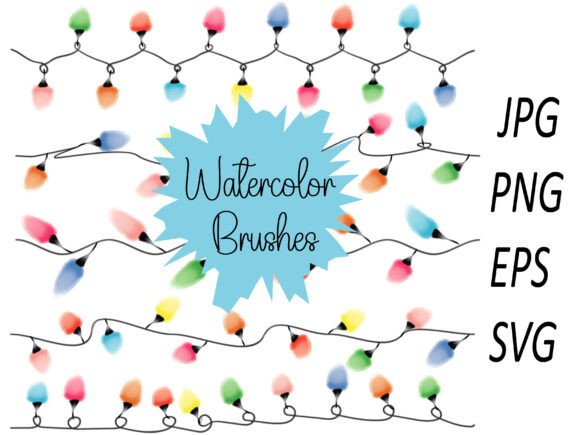
Transform Your Holiday Designs with Watercolour Light Line Brushes for Procreate
The holiday season is a time of warmth, creativity, and personal expression. Whether you are crafting handmade greeting cards for loved ones or designing professional invitations for corporate events, the right tools can make all the difference in bringing your vision to life. For digital artists using the Procreate app, the introduction of specialized brush sets has revolutionized how we approach seasonal art. Among these, the Watercolour Light Line Brushes stand out as an essential resource for creating delicate, festive designs that capture the magic of Christmas.
These brushes are not just about drawing lines; they are about evoking the soft glow of holiday lights against a winter night. The set includes five distinct brushes designed specifically for Christmas light watercolour effects, allowing for dynamic pressure sensitivity that mimics real-world painting techniques. From ornament details to sprawling decorative elements, this toolset empowers artists to create high-quality assets suitable for everything from scrapbooking to commercial merchandise.
The Magic of Pressure-Sensitive Christmas Lights
One of the most challenging aspects of digital art is replicating the organic feel of traditional media. Traditional watercolour relies on the flow of pigment and the texture of paper, while physical light strings have varying intensities and soft halos. The 5 brushes of Christmas Light Watercolour Brush Stroke Pressure solve this by integrating advanced pressure sensitivity into the Procreate workflow.
When you apply light pressure, the brush creates a faint, ethereal line perfect for background glows or distant ornaments. As you increase the pressure, the stroke becomes bolder and more saturated, simulating the bright focal point of a Christmas bulb. This dynamic range allows for a natural variation in your artwork that static vector lines simply cannot achieve. The result is a design that feels hand-painted and full of character, rather than rigid and computer-generated.
These Watercolour Light Line Brushes are particularly effective for creating the "bokeh" effect often seen in holiday photography—the soft, out-of-focus circles of light that add depth and atmosphere. By layering these strokes with different opacities, you can build up complex scenes where the lights seem to twinkle and shimmer, inviting the viewer into a cozy, festive world.
Versatility Across Creative Projects
The true power of this brush set lies in its versatility. While the primary focus is on Christmas themes, the underlying mechanics of light and watercolour make these brushes applicable to a wide array of creative endeavors. Here is how you can integrate them into your modern design workflow:
- Greeting Cards and Invitations: Create elegant borders or central motifs for anniversary and holiday invitations. The soft edges of the watercolour style blend beautifully with typography, ensuring the text remains legible while the design adds a touch of whimsy.
- Scrapbooking and Journaling: Digital scrapbookers can use these brushes to embellish photos of family gatherings or travel memories. A few strategic strokes of light can turn a standard photo into a cherished keepsake.
- Ornament and Element Design: Design standalone graphics that can be used as icons, social media stickers, or printables. The transparent backgrounds included in the file set make it easy to overlay these elements onto any project.
- Wall Art and Home Decor: Large-scale prints benefit immensely from the high resolution of these brushes. You can create abstract interpretations of holiday scenes that serve as sophisticated wall art, adding color and cheer to living spaces without being overly literal.
Beyond personal projects, these brushes open doors to commercial opportunities. The ability to generate unique, high-resolution assets quickly means you can produce a cohesive collection of designs for various products. Imagine a line of holiday-themed merchandise where every item shares the same glowing aesthetic, unified by the specific texture of the Watercolour Light Line Brushes.
From Digital Canvas to Physical Products
In today's maker economy, the journey from a digital sketch to a physical product is shorter than ever. The Watercolour Light Line Brushes are engineered with this transition in mind. Because the source files are created at 300 dpi, they meet the industry standard for high-quality printing. This ensures that when you move your design from the iPad screen to a physical object, the details remain crisp and vibrant.
Consider the possibilities for creating tangible gifts. You can take a design featuring twinkling lights and apply it to t-shirts using heat transfer methods. The soft gradients of the watercolour style work exceptionally well on fabric, avoiding the harsh, plasticky look often associated with cheap transfers. Similarly, these designs translate beautifully to mugs and tumblers. The curvature of these items interacts with the light-based designs in interesting ways, making the printed image appear even more three-dimensional.
For those interested in home decor, the high-resolution PNG and SVG files allow for precise cutting and printing on wood, canvas, or acrylic. You might design a custom sign for a front porch or a personalized coaster set for guests. The flexibility of the file formats ensures that whether you are working with a large format printer or a small vinyl cutter, the quality remains consistent.
Furthermore, these brushes are ideal for DIY enthusiasts who enjoy crafting. You can print your designs on cardstock to make homemade gift tags, wrap paper, or even decorate plain ceramic mugs using special paint pens guided by your digital template. The seamless integration of digital precision and analog creativity makes this toolset a powerhouse for the modern craftsperson.
Getting Started: Installation and Usage Guide
Integrating new tools into your creative process should be straightforward. The Watercolour Light Line Brushes package is designed for ease of use, ensuring you spend less time setting up and more time creating. The download includes a single .zip file containing all necessary assets, including the APS file for Procreate, along with PNG, JPG, and SVG versions for broader compatibility.
Follow these simple steps to get your holiday designs flowing:
- Download the Package: Secure the zip file containing the brush set and asset files. Ensure you have enough storage space on your device to unzip the contents.
- Open in Procreate: Launch the Procreate app on your iPad. If you already have a canvas open, you can proceed directly to the next step. If not, create a new canvas with a resolution of 300 dpi to maximize the quality of your work.
- Import the Brush: Navigate to the Brush Library icon (the brush symbol) in the top toolbar. Tap the "+" icon in the top left corner of the library panel. Select "Import Brushes" and locate the .aps file within your unzipped folder. Once imported, the Watercolour Light Line Brushes will appear in your custom brush set, ready for immediate use.
Once installed, experiment with the pressure settings. Use the Apple Pencil to vary the thickness and opacity of your strokes. Try combining the different brushes in the set to create layers of light and shadow. Remember that the PNG files included in the download feature a transparent background, making them perfect for compositing into other designs or sharing on social media platforms like Instagram and Pinterest.
Why Quality Matters in Digital Assets
When choosing digital resources, the difference between a good design and a great one often comes down to file quality. Many free or low-cost brushes suffer from pixelation when scaled up or lack the nuanced pressure response needed for professional work. The Watercolour Light Line Brushes address these common pain points head-on.
The inclusion of SVG files is a significant advantage for designers who need scalable vector graphics. Unlike raster images (PNG or JPG), SVGs can be resized infinitely without losing quality. This is crucial for projects that require the design to be printed at various sizes, from a small business card to a large banner. Additionally, the JPG files provide a convenient preview option for quick mockups or presentations where transparency isn't required.
The commitment to High quality 300 dpi ensures that your final output looks professional. In the world of print-on-demand and custom merchandise, clients and customers expect sharp, clear images. Blurry or pixelated designs can detract from the perceived value of a product. By starting with a high-resolution foundation, you guarantee that your t-shirts, mugs, and wall art will stand out in a crowded market.
Elevating Your Holiday Workflow
As the holiday season approaches, the demand for unique, personalized designs increases. Whether you are a hobbyist looking to make heartfelt gifts or a professional designer managing multiple client projects, efficiency and creativity are key. The Watercolour Light Line Brushes offer a streamlined way to achieve both.
By mastering these five brushes, you gain the ability to rapidly prototype ideas. Instead of spending hours trying to manually paint realistic lights, you can lay down the foundation of your design in minutes. This speed allows you to explore more concepts, iterate faster, and ultimately deliver better results. The organic nature of the watercolour effect adds a human touch that resonates with audiences, making your designs feel warm and inviting.
Whether you are designing a scrapbook page to commemorate a family reunion, creating a limited-edition t-shirt for a charity event, or crafting a bespoke invitation for a wedding anniversary, these brushes provide the artistic flair needed to make your project memorable. They bridge the gap between digital convenience and traditional artistry, empowering you to bring your festive visions to life with confidence and style.