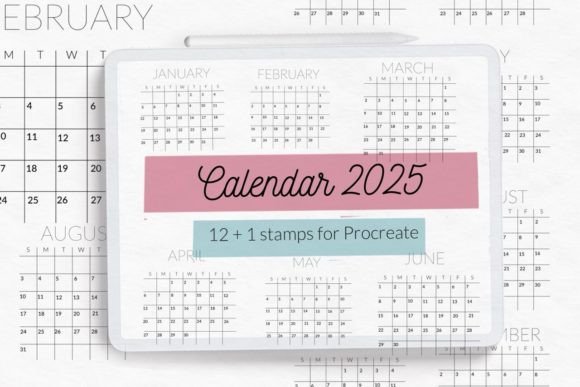
Calendar Grids 2025 Stamps Brushes for Efficient Digital Planning
For professionals, creators, and entrepreneurs who rely on digital tools to manage their time, the transition into a new year often requires a fresh organizational system. The Calendar Grids 2025 Stamps Brushes collection offers a streamlined solution for those using Procreate on iPad. This asset is designed to eliminate the tedious process of manually drawing grids, allowing users to focus immediately on content creation and strategic planning. By integrating these stamps into your workflow, you transform a blank canvas into a structured, functional planner in mere minutes.
The core value of this brushset lies in its precision and consistency. Unlike hand-drawn grids that may vary in spacing or alignment, these digital stamps provide uniform structures for every month. Whether you are managing a complex business schedule, tracking creative deadlines, or organizing personal goals, having a reliable visual framework is essential. The Calendar Grids 2025 Stamps Brushes set includes twelve distinct monthly stamps, each configured to start on Sunday and end on Saturday, adhering to standard calendar conventions used by most productivity systems.
Understanding the Asset Structure and Compatibility
Before integrating any new tool into your digital ecosystem, it is crucial to understand its technical specifications. The Calendar Grids 2025 Stamps Brushes are delivered as a single .brushset file specifically engineered for the Procreate application. It is important to note that this resource is optimized for Procreate version 4.0 and later. Users with older versions of the software will not be able to utilize this file, as the underlying engine requirements have changed significantly since earlier iterations. Ensuring your iPad has the latest compatible version of Procreate installed is the first step in a successful implementation.
The package is comprehensive yet focused. It contains:
- 12 Monthly Stamps: One for each month of 2025, pre-formatted with the correct number of days and starting on Sunday.
- Notes Section: Each monthly stamp includes a dedicated area for notes, allowing you to record key objectives, reminders, or thematic focuses for the month without cluttering the daily grid.
- 1-Year Overview Stamp: A full-year calendar grid that provides a macro view of the entire year, ideal for setting long-term milestones and visualizing seasonal trends.
This structure supports a hierarchical planning approach. You can begin with the yearly overview to identify major holidays, project launch dates, and vacations, then drill down into specific months to allocate tasks and appointments. The inclusion of a notes section within the monthly stamps encourages a holistic view of each period, balancing rigid scheduling with flexible reflection.
Integrating Stamps into Your Planning Workflow
The true power of the Calendar Grids 2025 Stamps Brushes emerges when they are applied within a broader workflow. For many users, the process begins before the actual planning takes place. Preparation involves setting up a new canvas in Procreate with dimensions suitable for your intended use—whether that is a vertical layout for a digital journal or a landscape orientation for a desktop-style planner.
Once the canvas is ready, the implementation is rapid. Instead of spending hours aligning lines and calculating day positions, you simply select the desired month from the brush library and tap the canvas. The stamp appears instantly, perfectly aligned and ready for input. This efficiency allows you to create multiple views simultaneously. For example, you might open one canvas for a weekly breakdown and another for a monthly review, ensuring that all aspects of your schedule are synchronized.
In a professional context, such as marketing or project management, these stamps serve as the foundation for Gantt charts or timeline visualizations. By establishing the temporal boundaries first, you can layer color-coded stickers, text layers, and checklists on top of the grid. This method separates the structural element (the calendar) from the content (the tasks), making it easier to edit, move, or update specific items without disrupting the overall layout.
Workflow Examples for Different User Types
Different roles require different approaches to planning. Here is how various professionals can leverage these stamps:
- Freelancers and Entrepreneurs: Use the monthly stamps to map out billing cycles, client deliverables, and tax deadlines. The notes section can track income projections or upcoming contract negotiations. The yearly stamp helps visualize cash flow seasons throughout 2025.
- Content Creators and Bloggers: Align the grid with your editorial calendar. Map out publishing dates, social media campaigns, and video production schedules. The ability to quickly generate a new month means you can easily adjust your strategy if a trend shifts or a deadline changes.
- Educators and Coaches: Plan curriculum units, class schedules, or coaching sessions. The Sunday-to-Saturday format aligns well with academic weeks and standard workweeks, reducing the cognitive load of adjusting for off-center days.
- Hobbyists and Journalers: Track habits, reading lists, or fitness goals. The clean design of the stamps ensures that your journal remains aesthetically pleasing while remaining functional.
Optimizing Usability and Organization
To maximize the utility of the Calendar Grids 2025 Stamps Brushes, consider how you organize your Procreate library. Upon importing the .brushset file, the brushes appear in your main menu. To keep your workspace tidy, you can create a custom folder named "2025 Planner" or similar. This prevents the stamps from getting lost among other artistic brushes and ensures quick access when you need to start a new page.
Consistency is key to effective planning. Because every month starts on Sunday and ends on Saturday, the visual rhythm of your planner remains constant. This predictability reduces friction when moving from one month to the next. You do not need to recalibrate your mental model of the week; the grid handles the logic for you. This consistency also aids in long-term reviews. When looking back at Q1 versus Q3, the identical grid structure makes it easy to compare productivity levels and goal achievement across different periods.
Furthermore, the separation of the grid from the writing layer is a significant advantage. In Procreate, you can place the calendar stamp on a locked background layer. This allows you to write freely over the grid, erase mistakes, or rearrange text boxes without ever altering the underlying dates. If you make an error in your plan, you can simply undo the writing action rather than redrawing the entire calendar. This non-destructive editing capability is vital for maintaining a high-quality, professional-looking document.
Strategic Implementation for Long-Term Success
While the initial setup is fast, the long-term value comes from how you maintain and evolve your planner. The Calendar Grids 2025 Stamps Brushes are static assets, meaning they represent the fixed dates of 2025. However, your plans are dynamic. To bridge this gap, develop a routine for updating your digital planner. Many users find success by reviewing their monthly stamp at the beginning of every week, marking completed tasks, and migrating unfinished items to the following week.
The included notes section should not be treated as an afterthought. Use it to define the "theme" of the month. For instance, January might be themed around "Strategy and Setup," while June could focus on "Growth and Expansion." Writing this theme in the notes area keeps your daily tasks aligned with your broader objectives. It serves as a constant reminder of the "why" behind your schedule, fostering better decision-making when unexpected opportunities or obstacles arise.
Compatibility with other digital resources is also a factor to consider. While these stamps are native to Procreate, the resulting images can be exported as PNGs or PDFs. This allows you to share your schedule with team members, print physical copies for wall display, or import them into presentation software. This flexibility ensures that your planning efforts are not siloed within a single app but can contribute to broader communication and collaboration efforts.
Quality Control and Professional Standards
When creating digital planners, quality control extends beyond the accuracy of the dates. It involves the clarity of the lines, the readability of the grid, and the overall aesthetic appeal. The Calendar Grids 2025 Stamps Brushes are designed with these standards in mind. The lines are crisp, and the spacing is calculated to accommodate standard handwriting sizes on an iPad screen. This attention to detail ensures that your planner looks professional, whether it is viewed on a small tablet screen or printed on large paper.
It is also worth noting the copyright and usage terms. These assets are created by Let s Art ♡ and are intended for use within the Procreate environment. Respecting intellectual property rights is part of maintaining a professional reputation. Using authorized, high-quality assets like these ensures that you are supporting the creators who develop these tools while avoiding potential legal issues associated with unlicensed materials.
Ultimately, the goal of any planning tool is to reduce cognitive load and increase execution. By automating the structural aspect of your calendar, the Calendar Grids 2025 Stamps Brushes free up mental energy for the more critical tasks of prioritization, strategy, and creativity. Whether you are launching a startup, managing a household, or pursuing a personal passion project, having a reliable, instant-access calendar system is a foundational element of success. With just a few taps, you can transform your iPad into a powerful command center for the year ahead, ensuring that every day of 2025 is accounted for and optimized for your unique goals.