Abstract Shapes and Photoshop Brushes
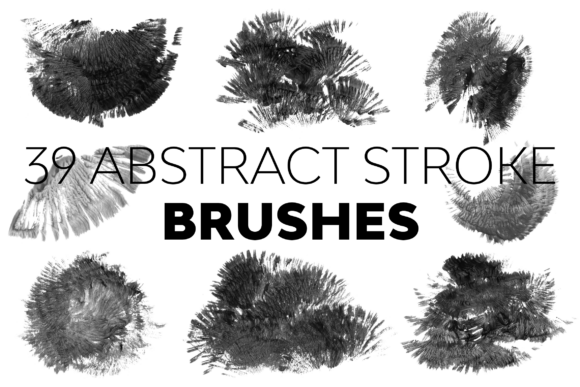
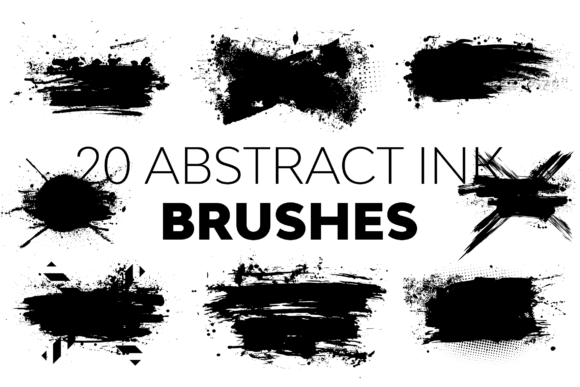
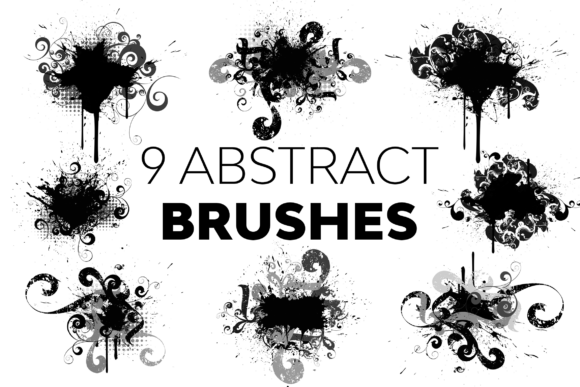
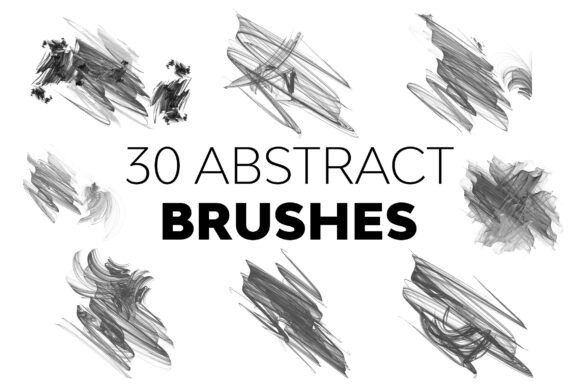
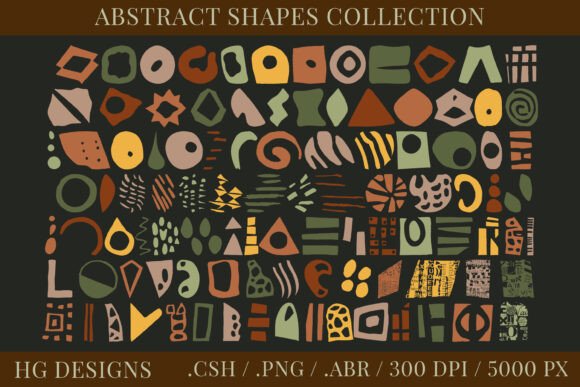
In the fast-paced world of digital design, having a versatile toolkit is often the difference between a good project and a great one. Whether you are crafting a logo for a startup, designing a sublimation print for a t-shirt, or creating a unique wall art piece, the right assets can streamline your workflow significantly. This collection of Abstract Shapes and Photoshop Brushes offers exactly that: a robust set of 100 distinct forms designed to elevate your creative output without the need for hours of manual drawing.
What makes this resource particularly valuable is not just the quantity, but the flexibility it provides across different file formats. Instead of being locked into a single method of usage, designers receive these shapes as high-resolution transparent PNGs, custom Photoshop brushes, and editable vector-style custom shapes. This multi-format approach ensures that the assets remain useful regardless of whether you are working on a quick social media graphic or a complex commercial illustration.
Why Versatility Matters in Digital Assets
The primary strength of this set lies in its adaptability. In professional environments, time is currency. Spending thirty minutes tracing a simple geometric form when a high-quality preset exists is an inefficient use of resources. By integrating Abstract Shapes and Photoshop Brushes into your workflow, you bypass the initial drafting phase and move straight to composition and refinement.
The inclusion of three distinct file types addresses various stages of the design process:
- Transparent PNG Files: These come at 300dpi, ensuring crisp edges even when printed. They are ideal for immediate placement in layouts where raster editing is sufficient.
- Photoshop Brushes (.abr): With each brush sized up to 5000 pixels on the longest side, these allow for dynamic, organic application. You can stamp shapes repeatedly with varying opacities and blend modes to create texture.
- Custom Shapes (.csh): These provide the most control, allowing you to scale, recolor, and manipulate the geometry directly within the shape layer properties.
This variety means you aren't forced to convert files or lose quality during the transfer from one program to another. The ability to switch between a static image and an editable vector-like shape gives you the freedom to experiment without committing to a final look too early.
Real-World Applications Across Industries
The utility of abstract geometry extends far beyond simple decoration. These shapes serve as foundational elements in branding, marketing materials, and product design. Let's explore how different professionals might leverage this set.
Brand Identity and Logo Design
For entrepreneurs and graphic designers, creating a memorable logo often starts with exploring basic forms. Abstract shapes can represent concepts like connectivity, growth, or stability without relying on literal imagery. Using the .csh format, a designer can quickly overlay multiple shapes, adjust their intersections, and apply gradients to create a modern, minimalist mark. The high resolution ensures that the final logo looks sharp on both a business card and a billboard.
Textile and Sublimation Printing
In the realm of physical products, such as clothing or home decor, patterns are essential. The 100 unique shapes in this collection are perfect for creating seamless patterns. Designers can arrange the PNG files in a grid, duplicate them, and add color variations to generate intricate textures. Because the files are provided at 300dpi, they meet the strict requirements for high-quality sublimation printing, preventing pixelation when the ink transfers to fabric.
Digital Marketing and Social Media
Marketers and bloggers constantly need fresh visuals to engage their audience. Static photos can become repetitive, but adding abstract overlays can transform a standard stock photo into something branded and unique. By using the Photoshop brushes, a content creator can add subtle, artistic splashes of color or geometric accents around text to draw attention to key messages. This enhances visual hierarchy and increases user engagement on platforms like Instagram or LinkedIn.
Educational and Presentation Materials
Even educators and corporate trainers benefit from these assets. When creating slideshows or instructional diagrams, generic clip art can look unprofessional. Replacing those with sleek, modern abstract shapes helps maintain a polished aesthetic. The shapes can be used as bullet points, section dividers, or background elements to make data more digestible and visually appealing.
Maximizing Efficiency and Creativity
One of the most significant benefits of using a curated set like this is the boost in productivity. When you have a library of 100 pre-made forms, the "blank canvas" paralysis becomes less of an issue. Instead of staring at an empty screen trying to decide what to draw, you can start dragging and dropping elements to see what combinations work best.
Furthermore, the bonus shapes included in the package add an extra layer of value, offering unexpected forms that might spark new ideas. Sometimes, a specific curve or angle found in a bonus asset is the missing piece needed to balance a composition. This serendipity is a hallmark of having a rich asset library.
From a technical standpoint, the large size of the brushes (5000 pixels) is crucial for large-format projects. Many free brush sets suffer from low resolution, resulting in jagged edges when scaled up. This set avoids that pitfall, ensuring that your work remains professional-grade regardless of the output size. Whether you are designing a small web icon or a massive mural, the integrity of the shape is preserved.
Practical Considerations for Implementation
While the versatility of Abstract Shapes and Photoshop Brushes is evident, successful implementation requires a bit of strategic thinking. It is easy to overuse decorative elements, which can clutter a design rather than enhance it. Here are a few recommendations for getting the most out of this collection:
- Maintain Visual Balance: Use the shapes to guide the eye, not distract from it. If you are using them as a background, lower the opacity so the main content remains legible.
- Color Consistency: Since the shapes are abstract, they rely heavily on color to convey meaning. Ensure that the hues you apply align with your brand palette or the mood of the project.
- Mix Formats Strategically: Don't feel limited to one file type. You might start by sketching with the .abr brushes to find a composition, then switch to the .csh custom shapes to refine the edges and colors before exporting as a PNG for final delivery.
- Combine with Other Elements: These shapes shine when paired with typography or photography. Experiment with blending modes like "Multiply" or "Overlay" to integrate the shapes seamlessly into existing images.
Additionally, while this set covers a wide range of needs, it is part of a broader ecosystem of resources. For those looking to expand their toolkit further, checking out the creator's shop for additional free and premium items can provide complementary assets that match the style and quality of this collection.
Conclusion
In summary, this collection of 100 abstract shapes is more than just a pack of graphics; it is a functional toolset designed to solve common design challenges. By offering high-resolution PNGs, scalable brushes, and editable custom shapes, it caters to a wide spectrum of users, from hobbyists experimenting with sublimation to professionals building corporate identities. The focus on quality, versatility, and ease of use makes it a worthwhile addition to any digital artist's library. By leveraging these assets effectively, you can save time, reduce creative friction, and produce work that stands out in a crowded digital landscape.